Stokaat.استوكات.
A complete marketplace for new stock.سوق متكامل لبيع الاستوك الجديد وشرائه.
A mobile marketplace where buyers find new stock from individual sellers and verified merchants, with order tracking, buyer protection and seller settlement built in, plus a dedicated control panel for the team that runs it.سوق على الجوال يجد فيه المشتري الاستوك الجديد لدى البائعين الأفراد والتجار الموثقين، مع متابعة للطلبات وحماية للمشتري وتسوية لمستحقات البائعين، ولوحة تحكم مخصصة للفريق الذي يدير السوق.
Real screenshots from the Flutter web build and admin panel · Isolated demo · Synthetic dataلقطات حقيقية من نسخة الويب لتطبيق Flutter ولوحة الإدارة · نسخة عرض معزولة · بيانات تجريبية
From finding the stock to settling with the seller.من العثور على الاستوك حتى التسوية مع البائع.
Every standard purchase links what the customer sees to the team that runs the market. Each stage has its own record, a clear owner and a visible next step.كل عملية شراء عادية تربط ما يراه العميل بعمل الفريق الذي يدير السوق. لكل مرحلة سجلها، وجهة مسؤولة عنها، وخطوة تالية واضحة.
Discover & decideالاكتشاف والقرار
Browse stock, compare details and see the buyer’s total before paying.تصفّح الاستوك، وقارن التفاصيل، واعرف الإجمالي المطلوب من المشتري قبل الدفع.
Order & deliverالطلب والتوصيل
Follow payment authorisation and each shipping milestone.تابِع تفويض الدفع وكل مرحلة من مراحل الشحن.
Protect & reviewالحماية والمراجعة
A protection window, with a clear route to raise a dispute.فترة حماية، ومسار واضح لفتح النزاع ومراجعته.
Settle & overseeالتسوية والإشراف
Review seller dues, payout batches and marketplace activity.راجِع مستحقات البائعين ودفعات الصرف ونشاط السوق.
A marketplace is much more than a product list.السوق أكبر بكثير من مجرد قائمة منتجات.
Open any card to see its real screens and what it does for buyers, sellers and your team.افتح أي بطاقة لتشاهد شاشاتها الحقيقية، وتعرف ما تقدمه للمشتري والبائع وفريقك.
 01Browsing & searchالتصفح والبحثNew stock, easy to find.استوك جديد، يصل إليه المشتري بسهولة.3 features · 3 screens٣ مزايا · ٣ شاشات
 02Product detailsتفاصيل المنتجProduct, stock and price, clear before the buyer decides.المنتج والكمية والسعر، كلها واضحة قبل قرار الشراء.3 features · 2 screens٣ مزايا · شاشتان
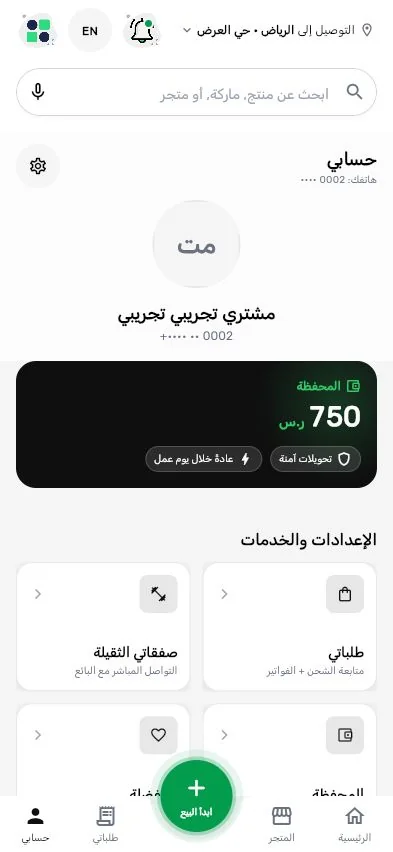 03Sign-in & accountsالدخول والحساباتOne account, with a clear path to buy or sell.حساب واحد، وطريق واضح للشراء أو البيع.3 features · 3 screens٣ مزايا · ٣ شاشات
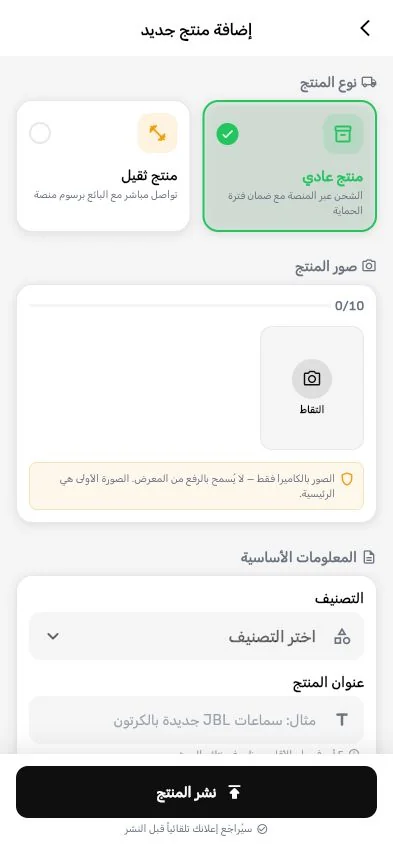 04Seller listingsإعلانات البائعSellers stay in control of what they publish.يتحكم البائع في كل ما ينشره.3 features · 3 screens٣ مزايا · ٣ شاشات
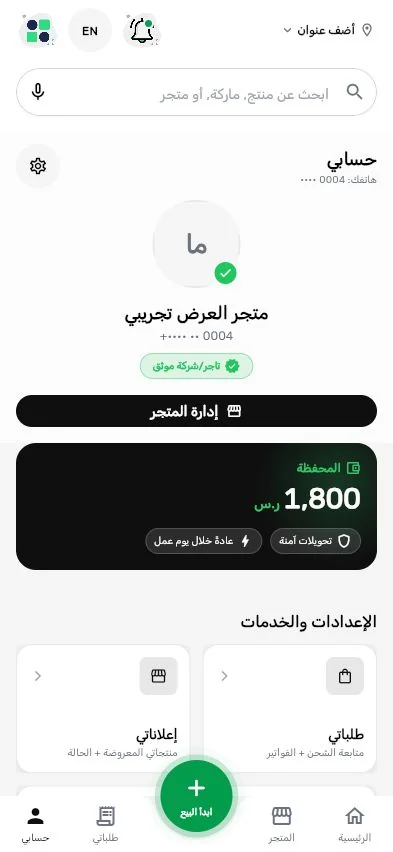 05Merchant storeمتجر التاجرA merchant hub, built around the store.لوحة خاصة بالتاجر، محورها متجره.2 features · 1 screenميزتان · شاشة واحدة
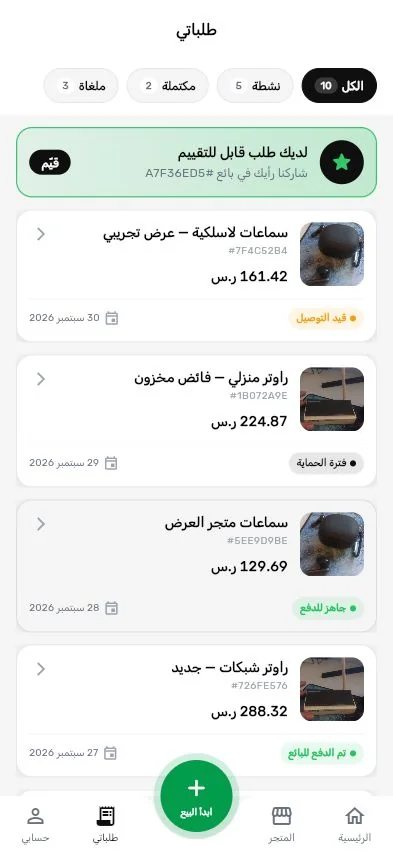 06Orders & shippingالطلبات والشحنEvery order has a clear next step.لكل طلب خطوة تالية واضحة.3 features · 4 screens٣ مزايا · ٤ شاشات
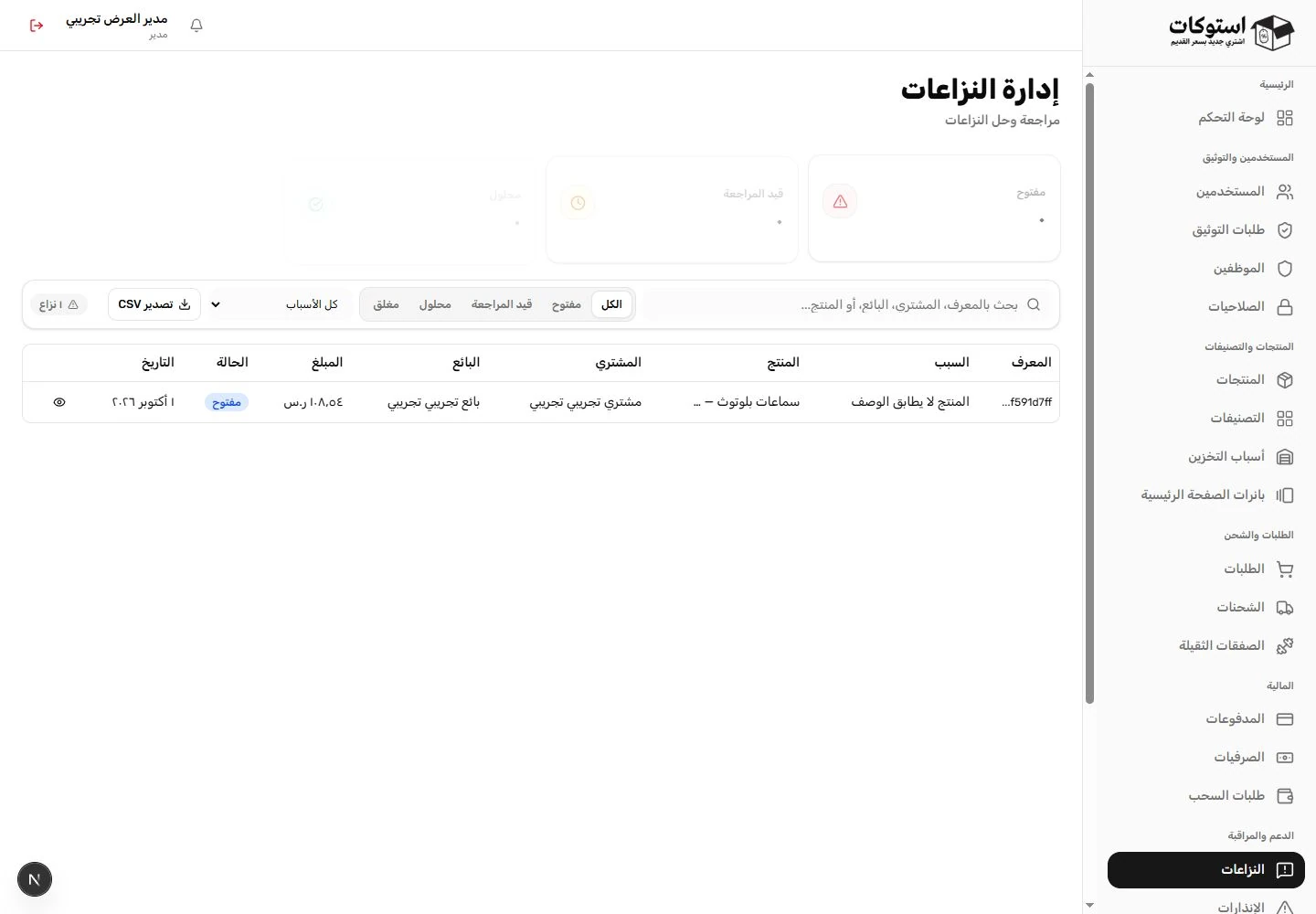
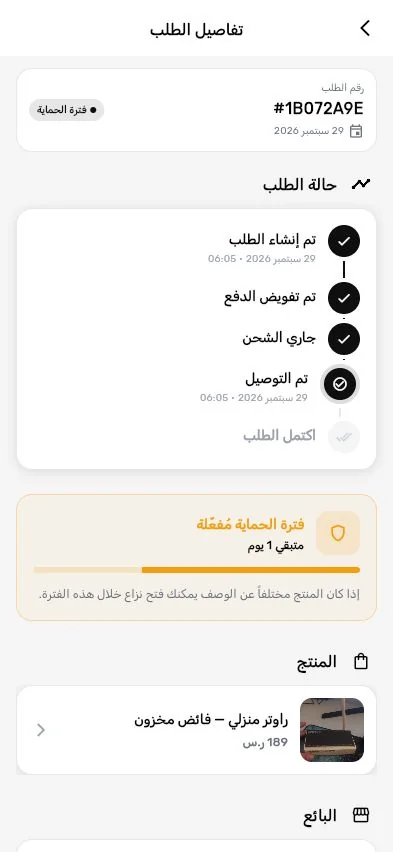 07Buyer protectionحماية المشتريProtection doesn’t end at delivery.الحماية لا تنتهي عند التسليم.3 features · 3 screens٣ مزايا · ٣ شاشات
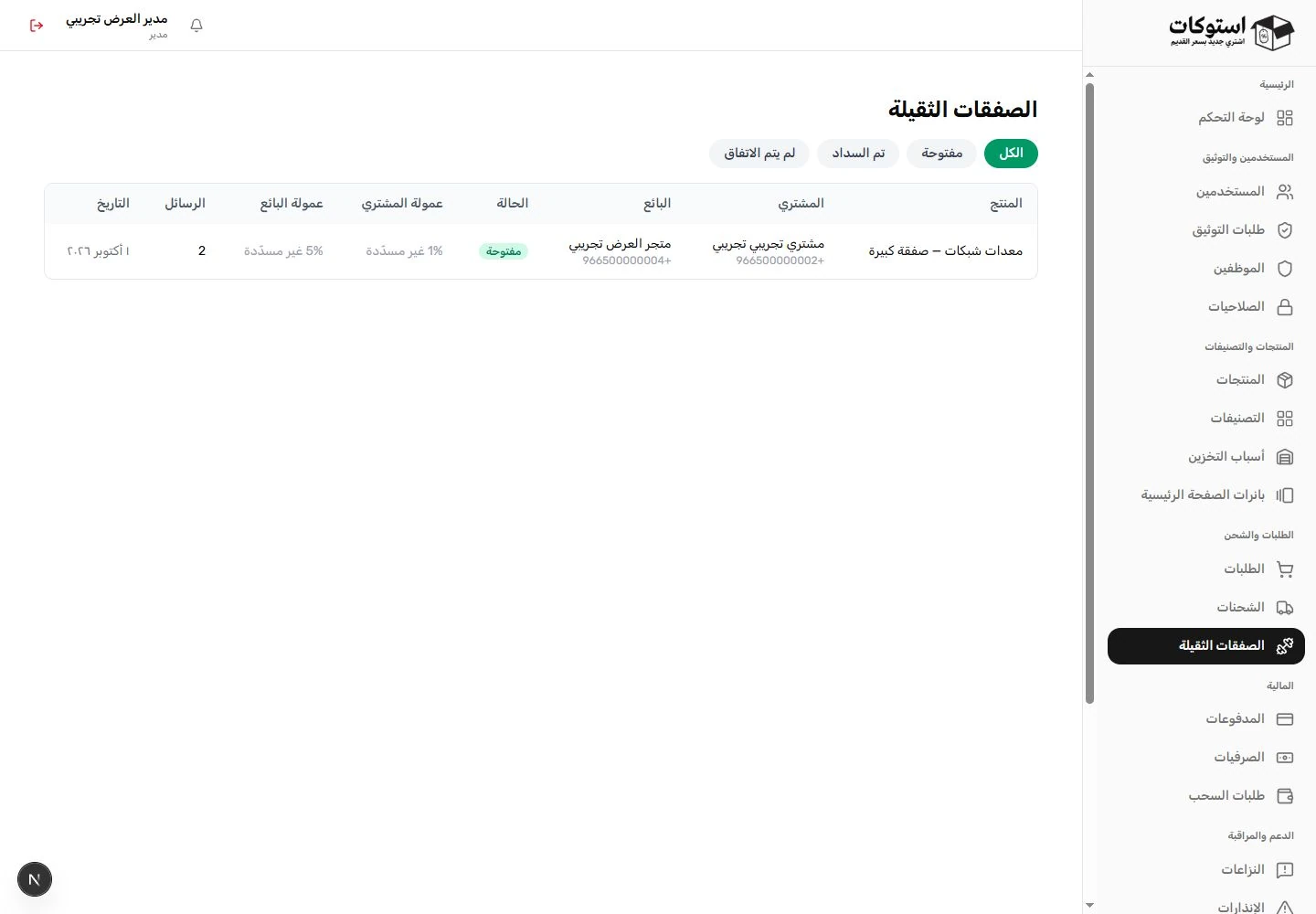
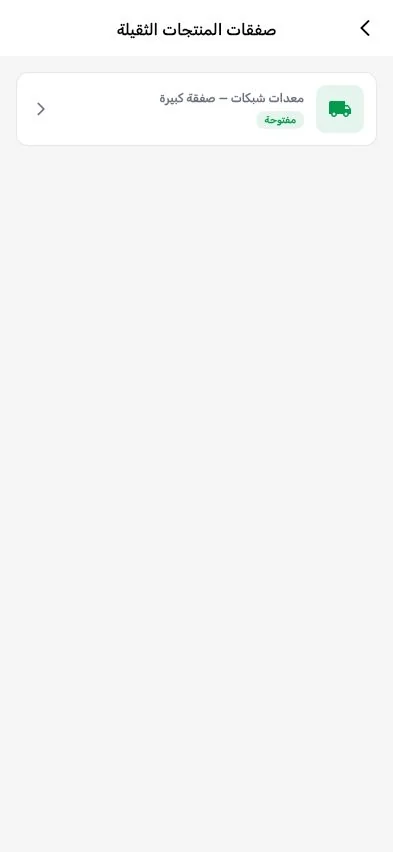 08Large-item dealsصفقات المنتجات الثقيلةLarge items get their own kind of deal.للمنتجات الثقيلة طريقة اتفاق خاصة بها.3 features · 3 screens٣ مزايا · ٣ شاشات
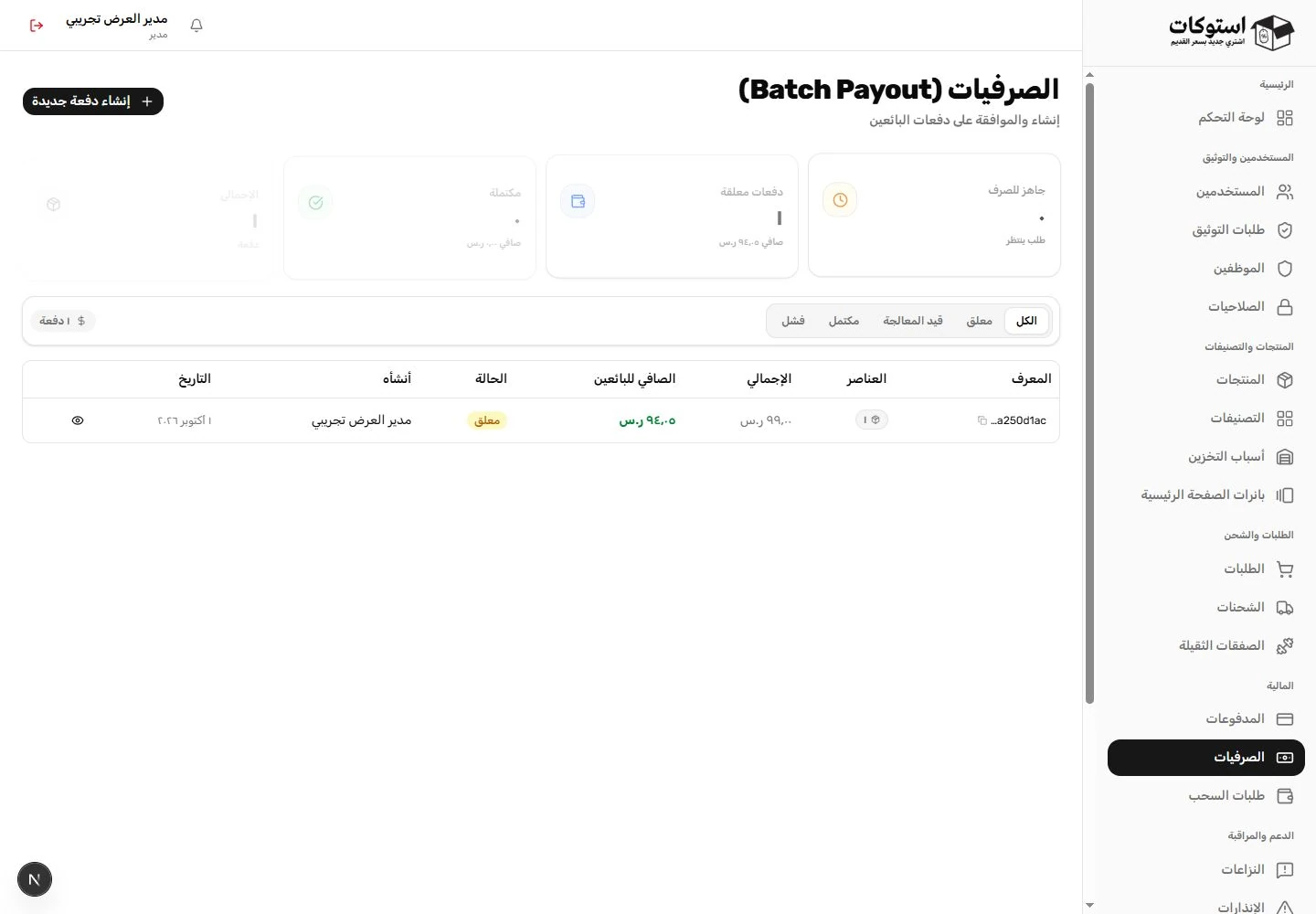
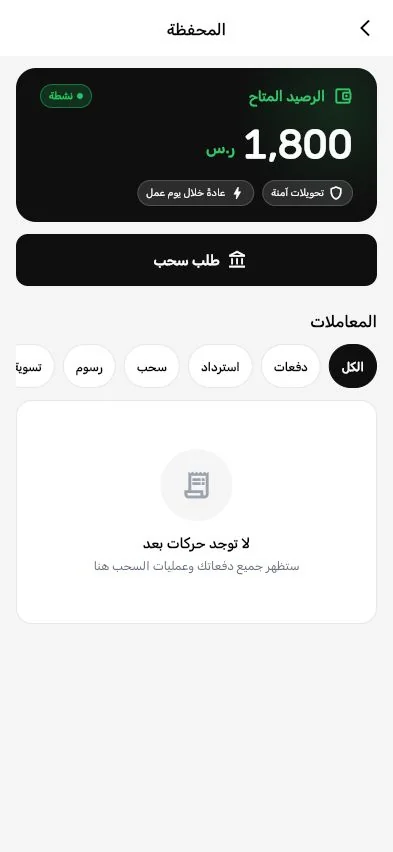 09Wallets & payoutsالمحافظ والتسوياتSeller payouts, checked before they go out.مستحقات البائعين، تُراجَع قبل صرفها.3 features · 4 screens٣ مزايا · ٤ شاشات
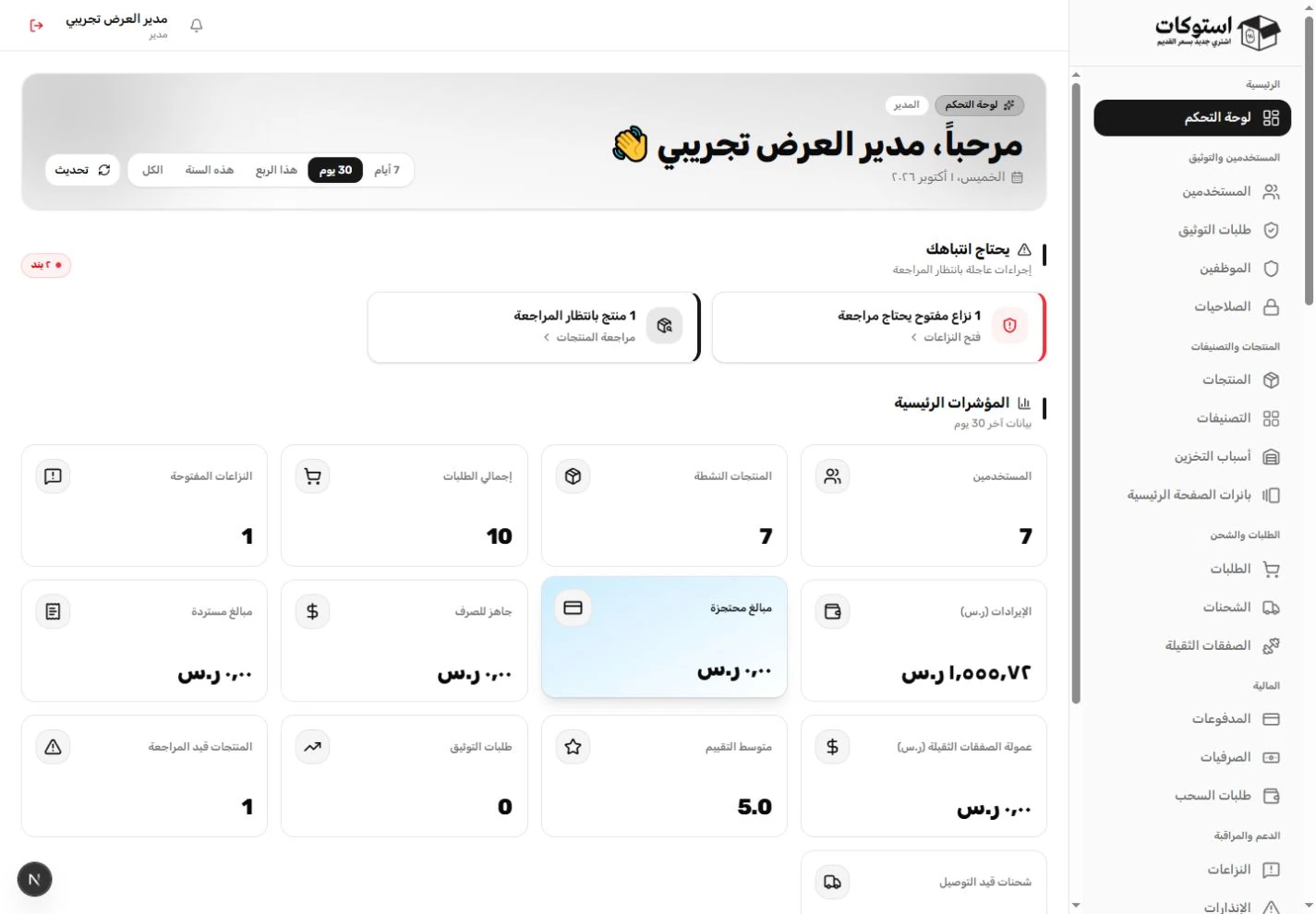
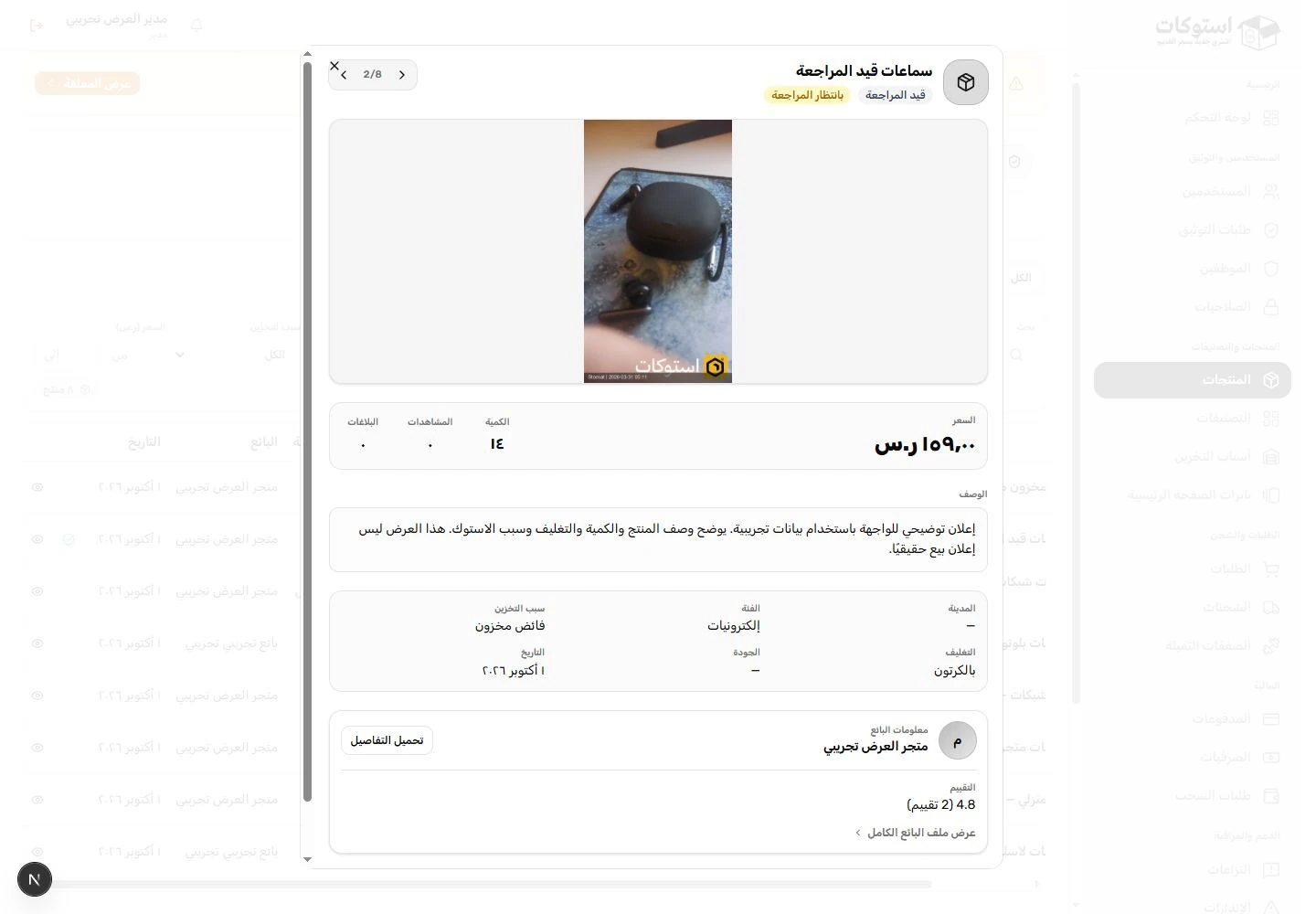
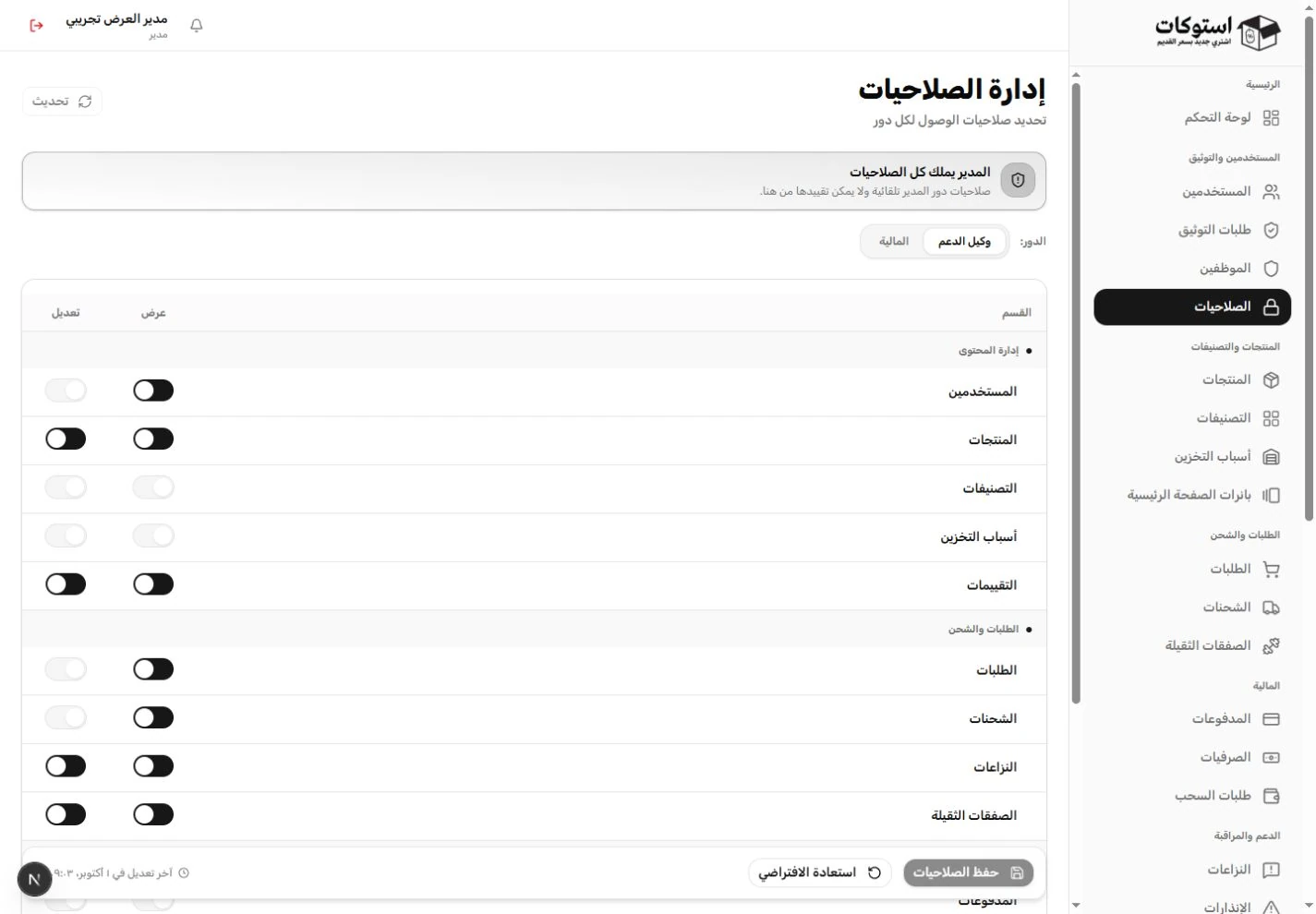
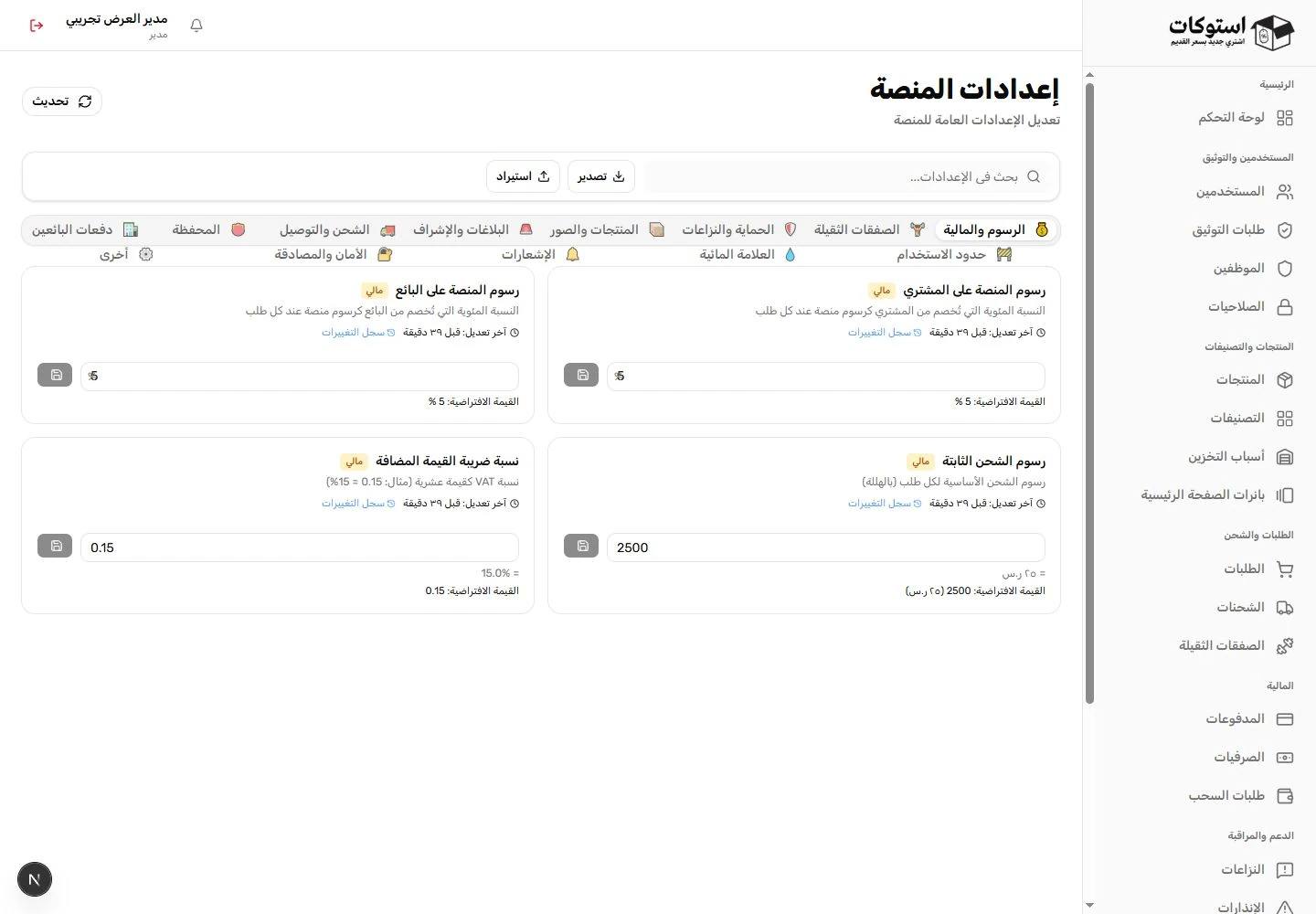
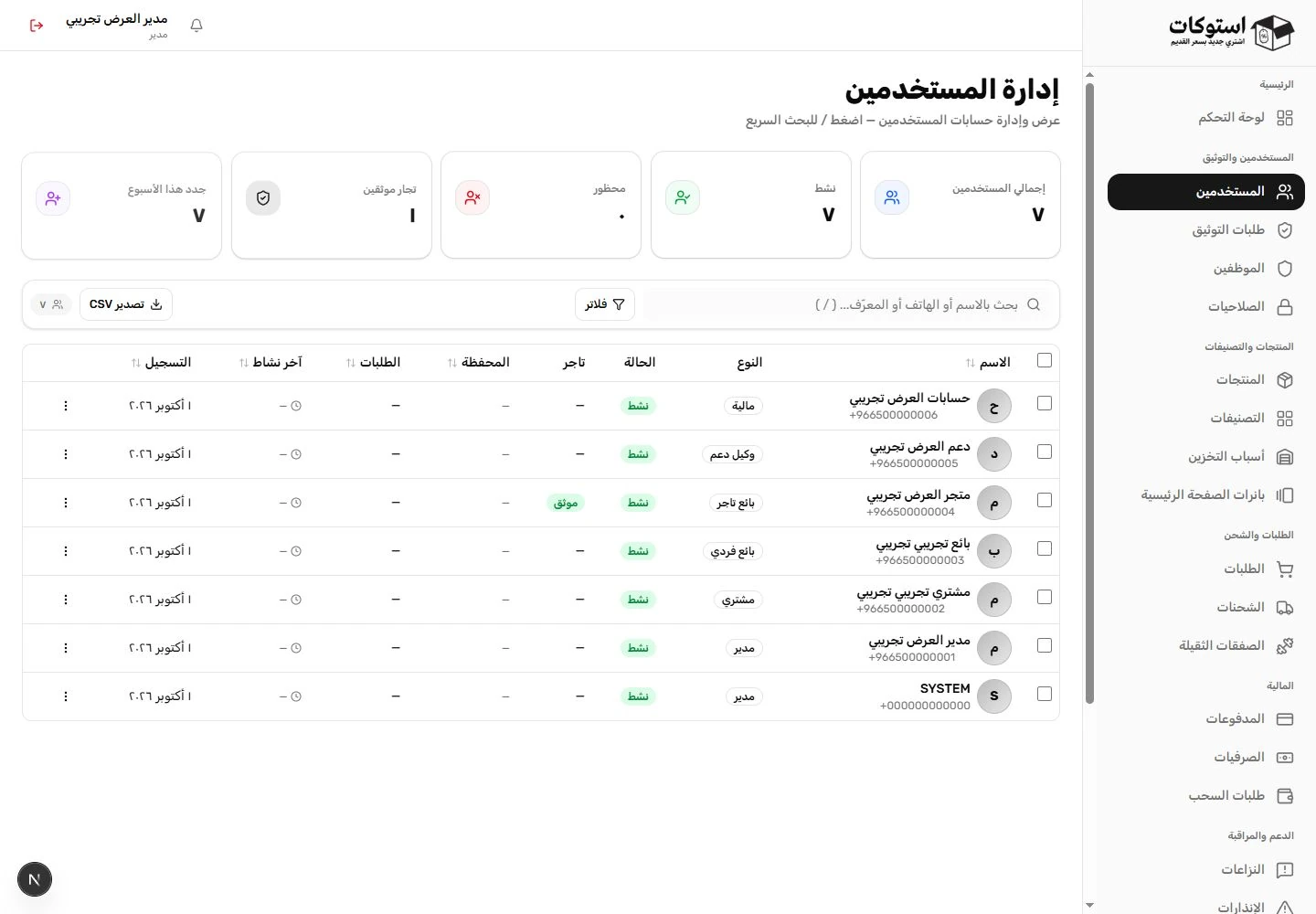
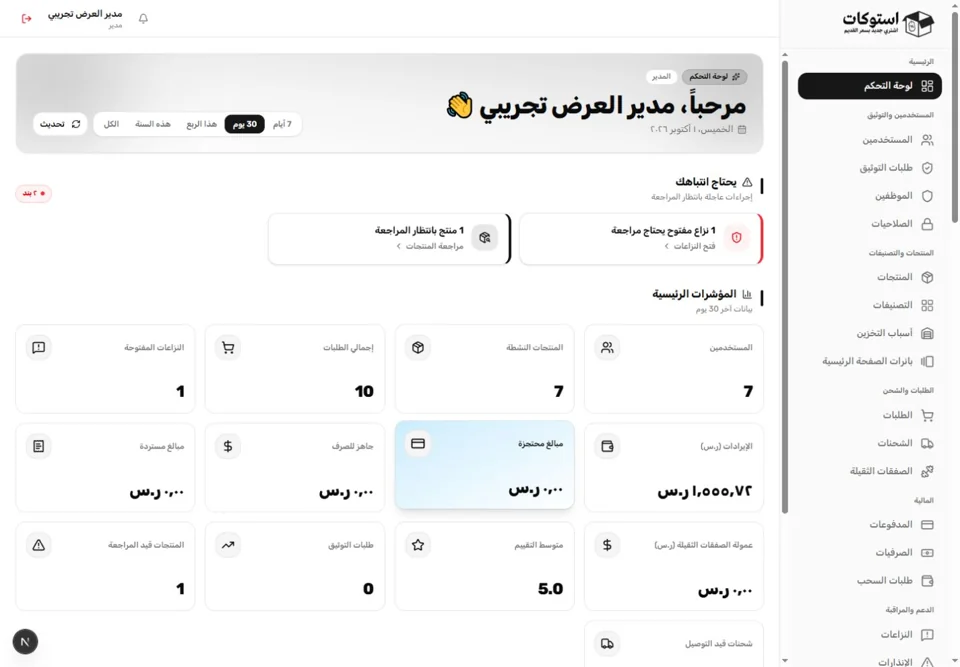 10Admin panelلوحة الإدارةRun your marketplace by rules your whole team can see.أدِر سوقك بقواعد واضحة أمام فريقك كله.3 features · 5 screens٣ مزايا · ٥ شاشات
New stock, easy to find.استوك جديد، يصل إليه المشتري بسهولة.
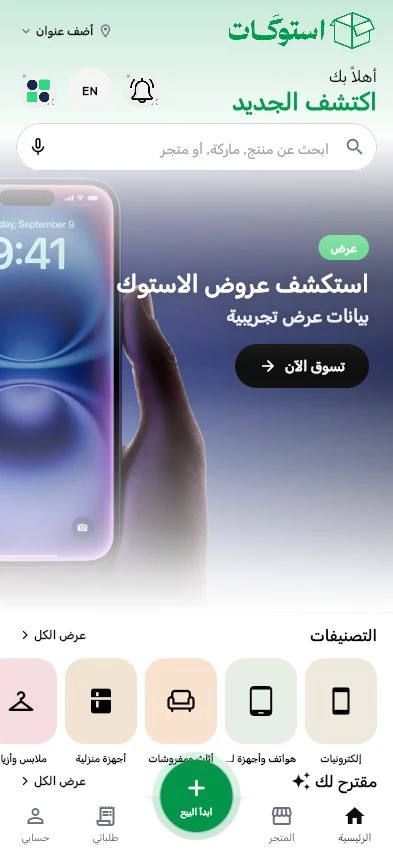
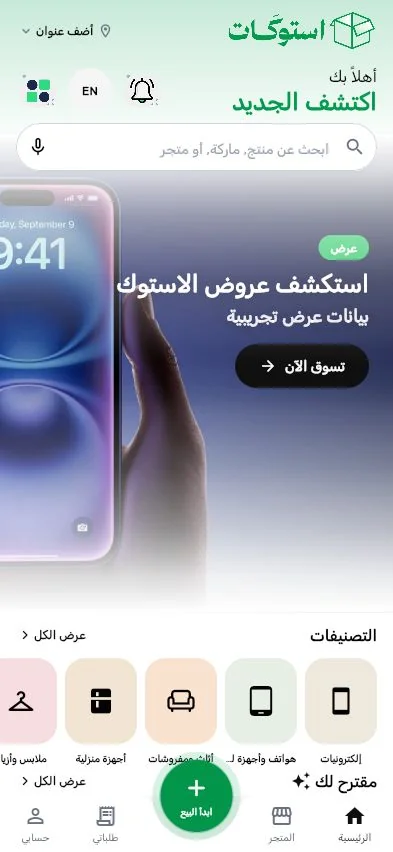
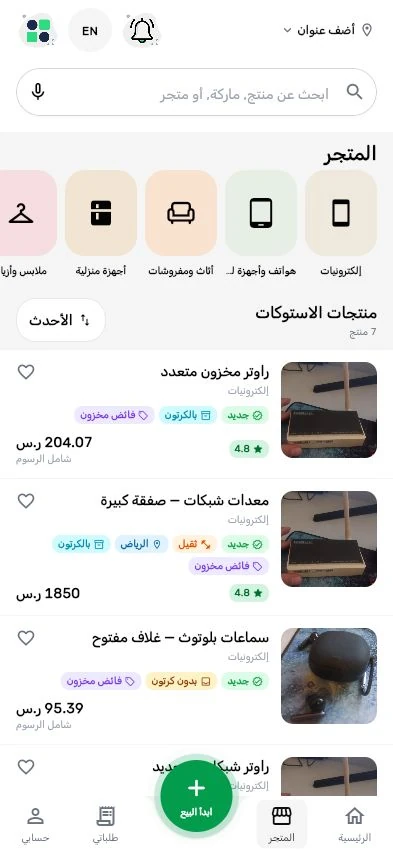
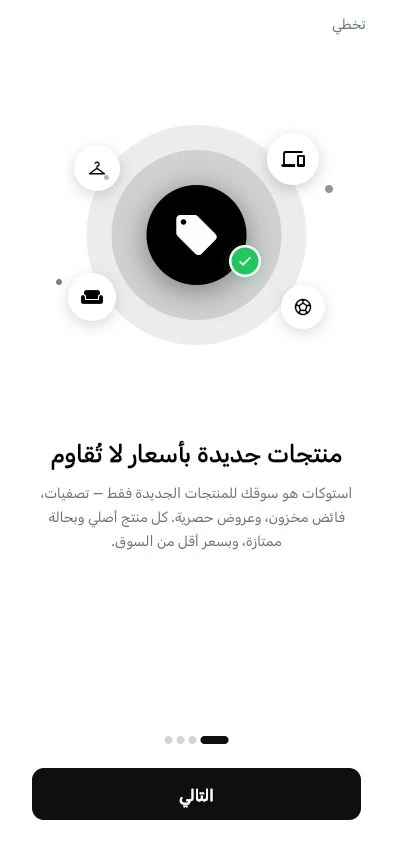
In Stokaat, new stock gets a storefront of its own. Buyers can browse the catalogue before signing in, explore categories and go from a promotion to the product page in a few taps.في استوكات، يحصل الاستوك الجديد على واجهة عرض خاصة به. يتصفح المشتري الكتالوج قبل تسجيل الدخول، ويتنقل بين التصنيفات، ويصل من العرض الترويجي إلى تفاصيل المنتج بضغطات قليلة.
See all featuresكل المزايا بالتفصيل
A storefront on mobileواجهة متجر على الجوال
The home screen brings together promotional banners, categories and suggested products. Your team manages the categories and home banners from the admin panel.تجمع الشاشة الرئيسية البانرات الترويجية والتصنيفات والمنتجات المقترحة، ويدير فريقك التصنيفات وبانرات الشاشة الرئيسية من لوحة الإدارة.
Find the right stockالعثور على الاستوك المناسب
Search products, then narrow the results with the catalogue’s filters and sorting options. Listings tell standard products apart from large-item deals.ابحث في المنتجات، وضيّق النتائج بفلاتر الكتالوج وخيارات الترتيب. وتميّز الإعلانات بين المنتجات العادية وصفقات المنتجات الثقيلة.
Save it for laterاحفظه لوقت لاحق
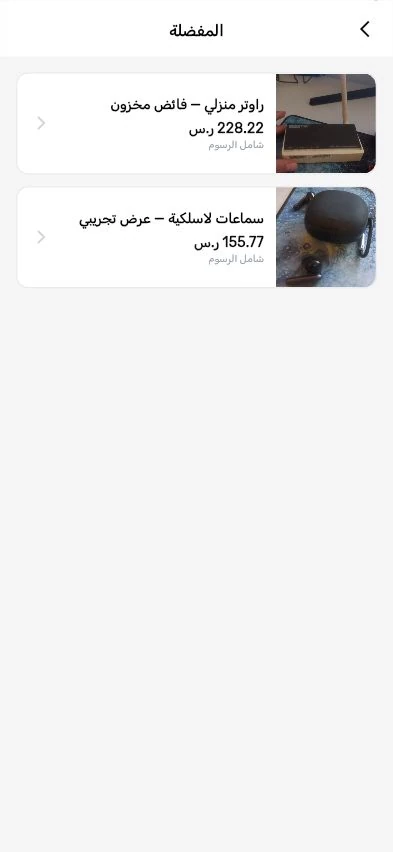
Signed-in buyers save products to their wishlist and come back to the details whenever they like.يحفظ المشتري المسجَّل المنتجات في قائمة المفضلة، ويعود إلى تفاصيلها متى شاء.
Product, stock and price, clear before the buyer decides.المنتج والكمية والسعر، كلها واضحة قبل قرار الشراء.
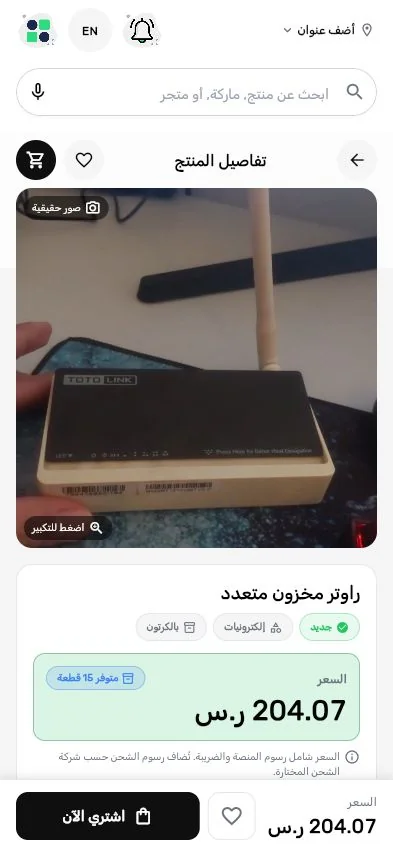
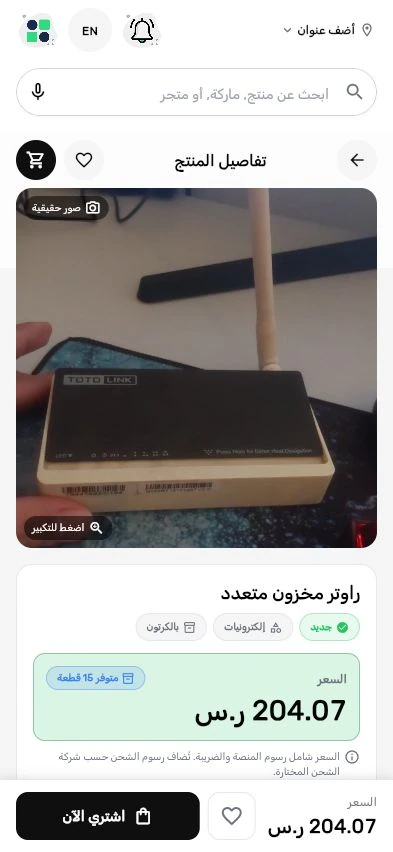
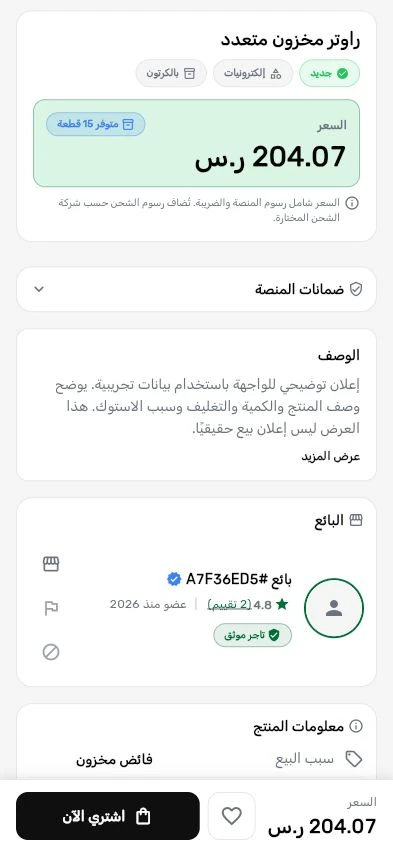
Each listing goes beyond a photo and a price. The product page brings together the description, packaging, available quantity, why the item is in stock and seller trust details, with the price breakdown right where the buyer decides.الإعلان هنا أكثر من صورة وسعر. تجمع صفحة المنتج الوصف والتغليف والكمية المتاحة وسبب طرحه كاستوك وبيانات الثقة في البائع، مع تفصيل السعر أمام المشتري لحظة اتخاذ القرار.
See all featuresكل المزايا بالتفصيل
Why it’s in stockسبب واضح لكل استوك
Show why a new product is being sold as stock, such as surplus inventory, a model change or a store clearance. Category and packaging fields keep every listing well organised.وضّح سبب بيع المنتج الجديد كاستوك، مثل فائض المخزون أو تغيير الموديل أو تصفية متجر، مع حقول التصنيف والتغليف التي تُبقي الإعلان منظمًا.
Charges the buyer can seeرسوم واضحة للمشتري
The product price, platform fees and any applicable tax are shown separately, so the buyer understands the total. You set the rates in line with your marketplace policy.تعرض الواجهة سعر المنتج ورسوم المنصة والضريبة المطبقة كلًّا على حدة، ليفهم المشتري الإجمالي المعروض. وتضبط أنت النسب وفق سياسة سوقك.
Seller trust, without open contactثقة بالبائع، دون تواصل مفتوح
Seller IDs, verification and ratings help the buyer decide. For standard products, communication goes through support; direct chat is reserved for large-item deals.يساعد معرّف البائع وتوثيقه وتقييماته المشتري على اتخاذ قراره. في المنتجات العادية يمر التواصل عبر الدعم، أما المحادثة المباشرة فمخصصة لصفقات المنتجات الثقيلة.
One account, with a clear path to buy or sell.حساب واحد، وطريق واضح للشراء أو البيع.
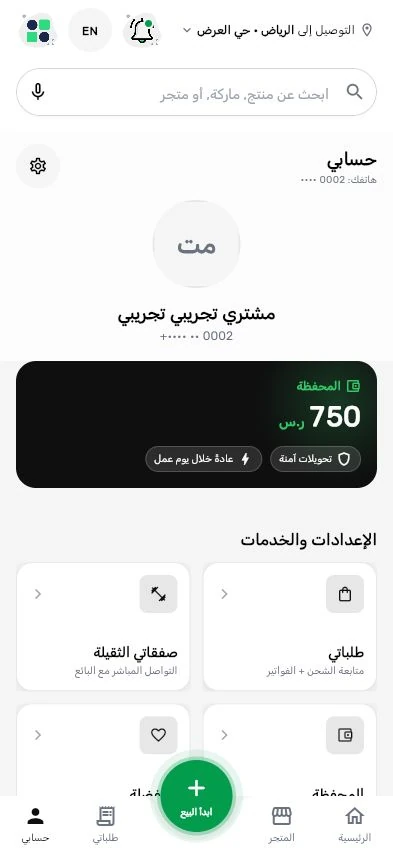
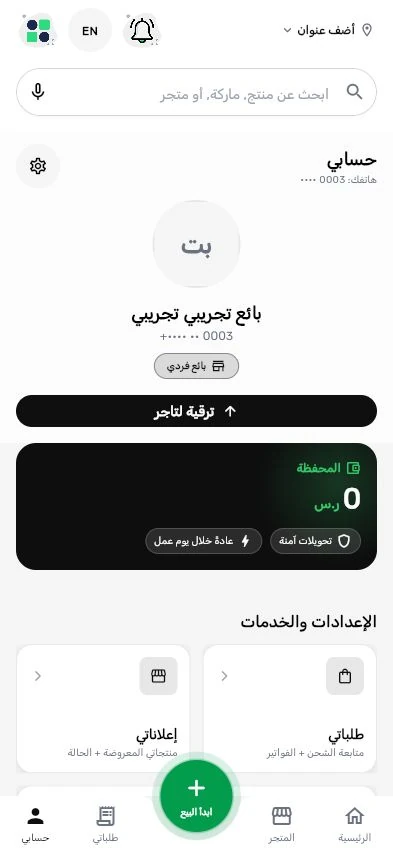
Shoppers sign in with their phone number and land on their personal account. Individuals can switch on selling, while merchants go through a separate verification path before the verified store tools become available.يدخل العميل برقم جواله إلى حسابه الشخصي. ويستطيع الفرد تفعيل البيع، بينما يمر التاجر بمسار توثيق مستقل قبل أن تُتاح له أدوات المتجر الموثق.
See all featuresكل المزايا بالتفصيل
Phone verificationالتحقق برقم الجوال
Sign in with a phone number and a verification code. From the account screen, reach orders, the wishlist, ratings, notifications and the wallet.سجِّل الدخول برقم الجوال ورمز التحقق، ومن شاشة الحساب انتقل إلى الطلبات والمفضلة والتقييمات والإشعارات والمحفظة.
Selling as an individualالبيع كفرد
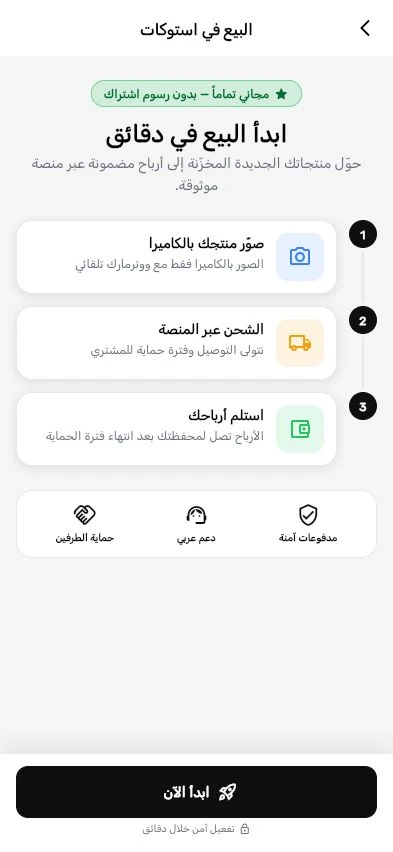
Turning on selling walks the user through how it works. Individual sellers then get their own listing and sales tools.عند تفعيل البيع يتعرّف المستخدم على خطواته، ثم يحصل البائع الفرد على أدوات خاصة لإدارة إعلاناته ومبيعاته.
Merchant verificationتوثيق التجار
Merchant requests are reviewed by the admin team. Access to store management depends on the account type and its verification status.تمر طلبات التجار بمراجعة من الإدارة، ولا تُتاح إدارة المتجر إلا حسب نوع الحساب وحالة توثيقه.
Sellers stay in control of what they publish.يتحكم البائع في كل ما ينشره.
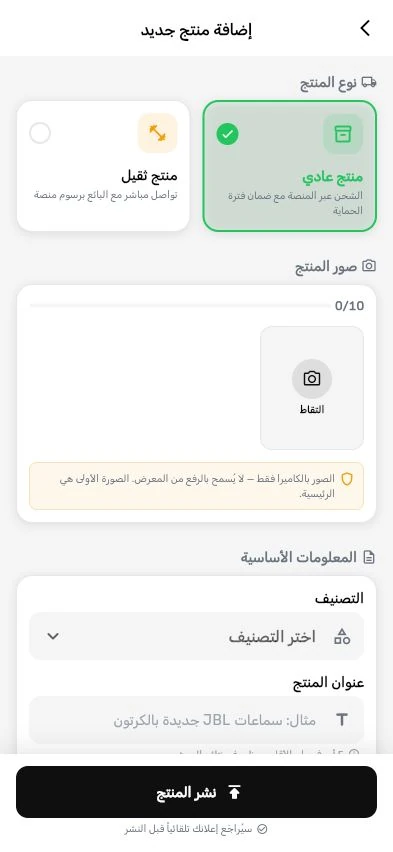
Listing a product is a guided flow that organises the details before anything goes live. Sellers choose a standard or large item, add photos, describe the stock, then follow its review and publication status from their own listings.إضافة المنتج مسار منظم يرتّب بياناته قبل النشر. يختار البائع نوع المنتج، عاديًا أو ثقيلًا، ويجهّز الصور ويصف الاستوك، ثم يتابع حالة المراجعة والنشر من قائمة إعلاناته.
See all featuresكل المزايا بالتفصيل
Step-by-step product entryإدخال منظم لبيانات المنتج
Take product photos and fill in the category, title, description, price, packaging, quantity and stock reason. Photos are watermarked and follow a main-image rule.التقط صور المنتج، وأدخل التصنيف والعنوان والوصف والسعر والتغليف والكمية وسبب الاستوك. وتُضاف علامة مائية إلى الصور، مع قاعدة لتحديد الصورة الرئيسية.
Stock and listing statusالمخزون وحالة الإعلان
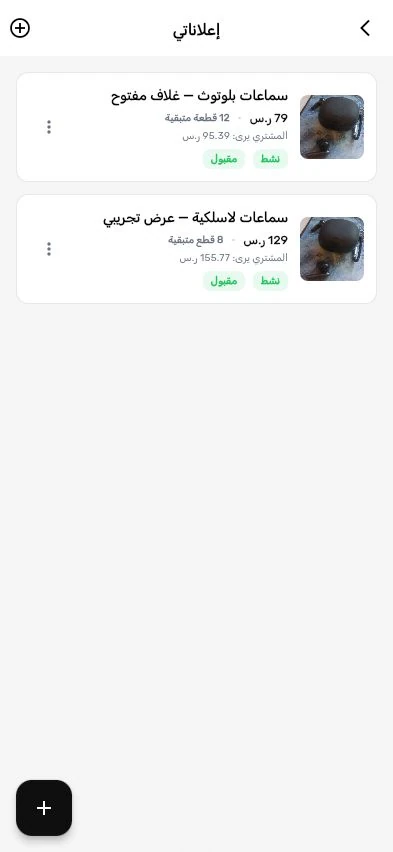
The seller’s list shows the remaining quantity, the price buyers see and each listing’s review and publication status, so sellers know what is available and what is still under review.تعرض قائمة البائع الكمية المتبقية والسعر الذي يراه المشتري وحالة المراجعة والنشر لكل إعلان، ليعرف البائع المتاح من مخزونه وما ينتظر المراجعة.
A dedicated sales viewشاشة مستقلة للمبيعات
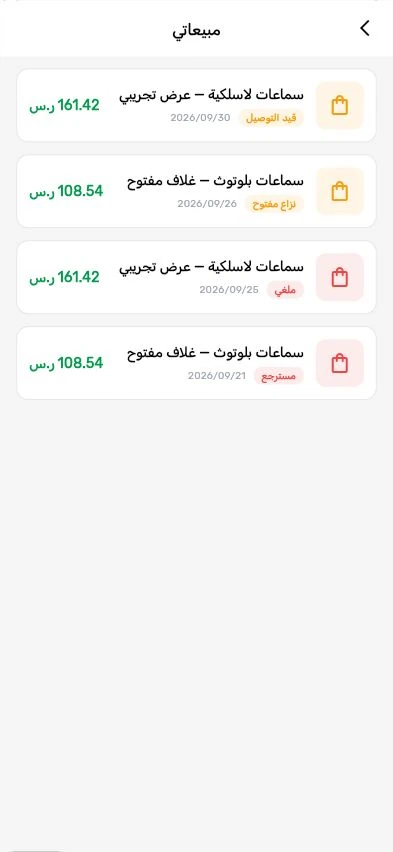
Received orders are grouped with their current status and value. Open any order to follow it step by step.تُعرض الطلبات المستلمة مع حالة تنفيذها الحالية وقيمتها، وافتح أي طلب لتتابع مساره خطوة بخطوة.
A merchant hub, built around the store.لوحة خاصة بالتاجر، محورها متجره.
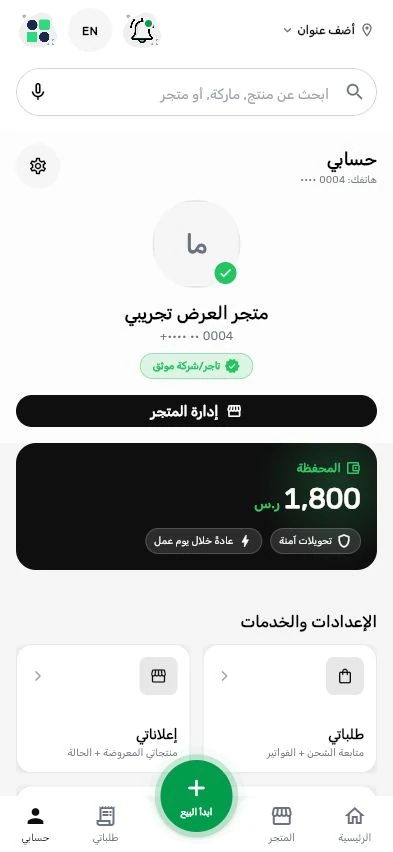
Verified merchants get a private hub for managing their store. It shows active listings, rating and wallet balance next to the store’s name and logo, while what buyers see of the seller stays within the platform’s privacy rules.يحصل التاجر الموثق على لوحة خاصة لإدارة متجره، تعرض الإعلانات النشطة والتقييم ورصيد المحفظة بجوار اسم المتجر وشعاره، بينما تبقى هوية البائع الظاهرة للمشتري ضمن قواعد الخصوصية في المنصة.
See all featuresكل المزايا بالتفصيل
A private store overviewملخص خاص بالمتجر
See the number of active listings, the seller rating and the wallet balance on the store screen, all drawn from the merchant’s own records.راجِع عدد الإعلانات النشطة وتقييم البائع ورصيد المحفظة من شاشة المتجر، وكلها مأخوذة من سجلات التاجر نفسه.
Store identity, kept internalهوية المتجر للإدارة الداخلية
Edit the store name and logo. The name is marked as internal information; buyers see the platform’s seller ID instead.عدّل اسم المتجر وشعاره. يظهر الاسم كبيان داخلي للإدارة، بينما يرى المشتري معرّف البائع الخاص بالمنصة.
Every order has a clear next step.لكل طلب خطوة تالية واضحة.
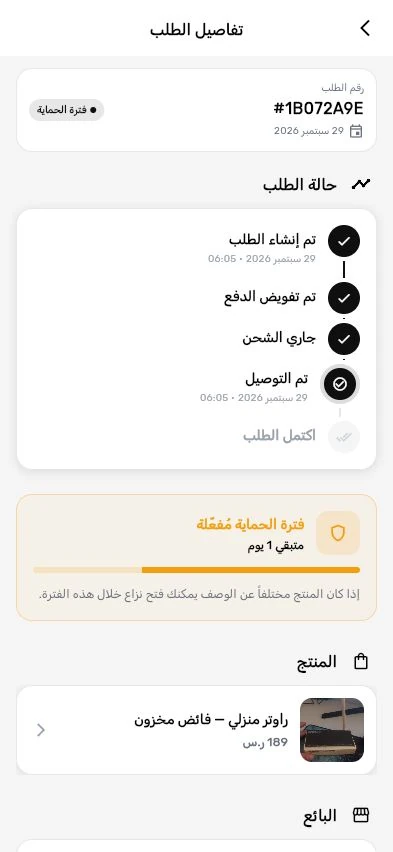
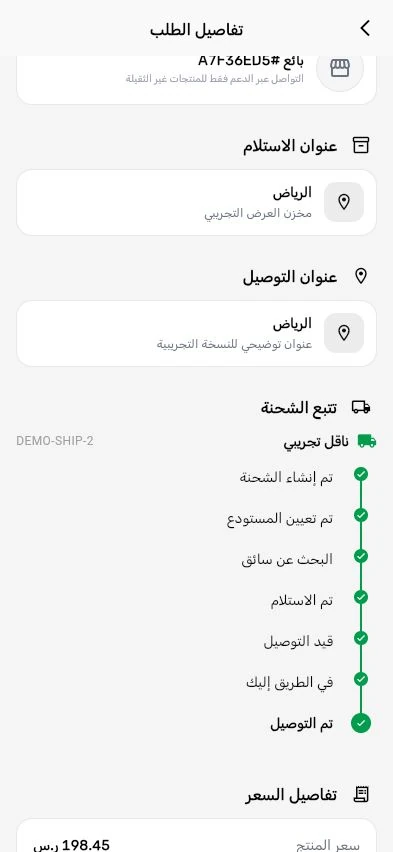
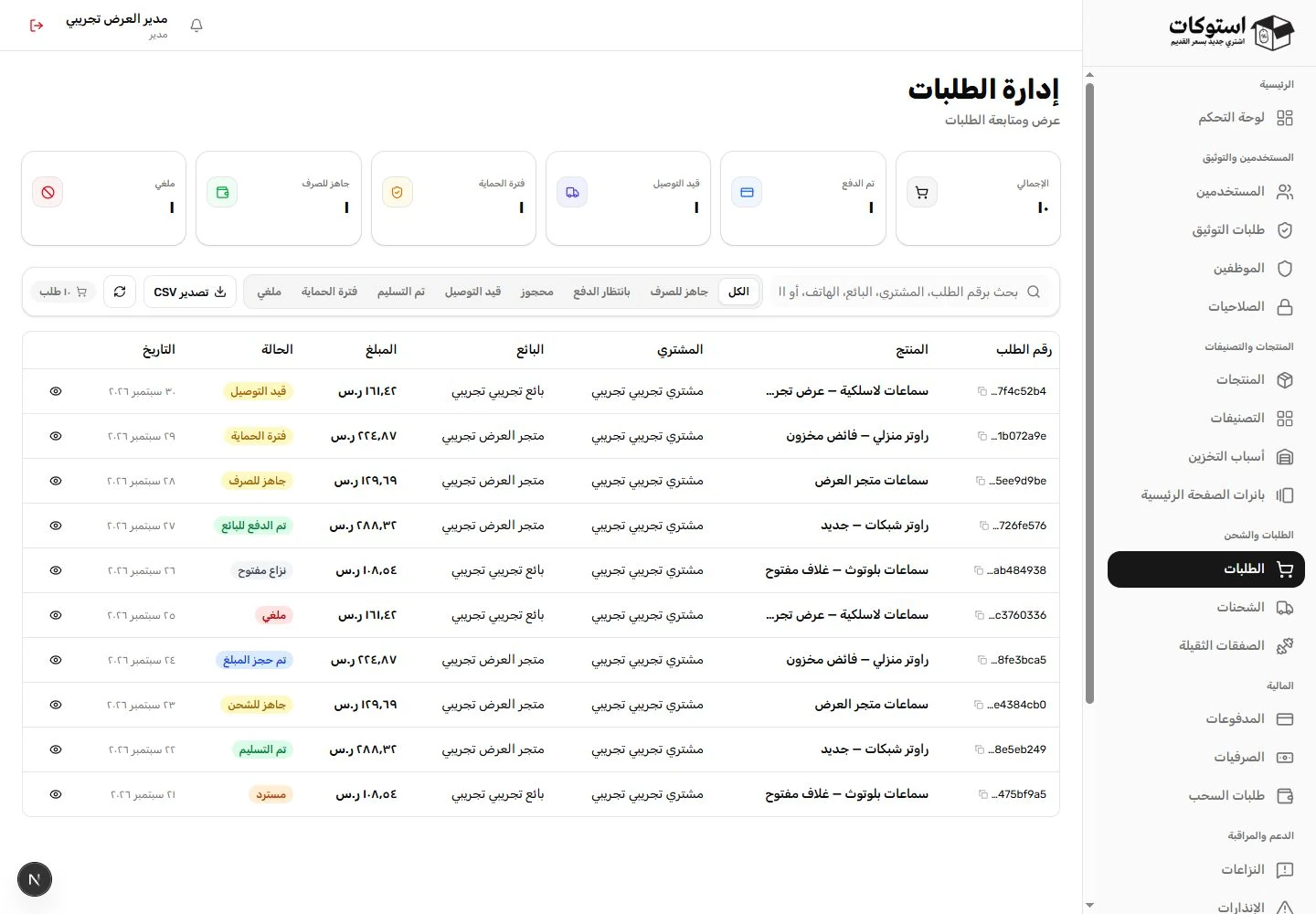
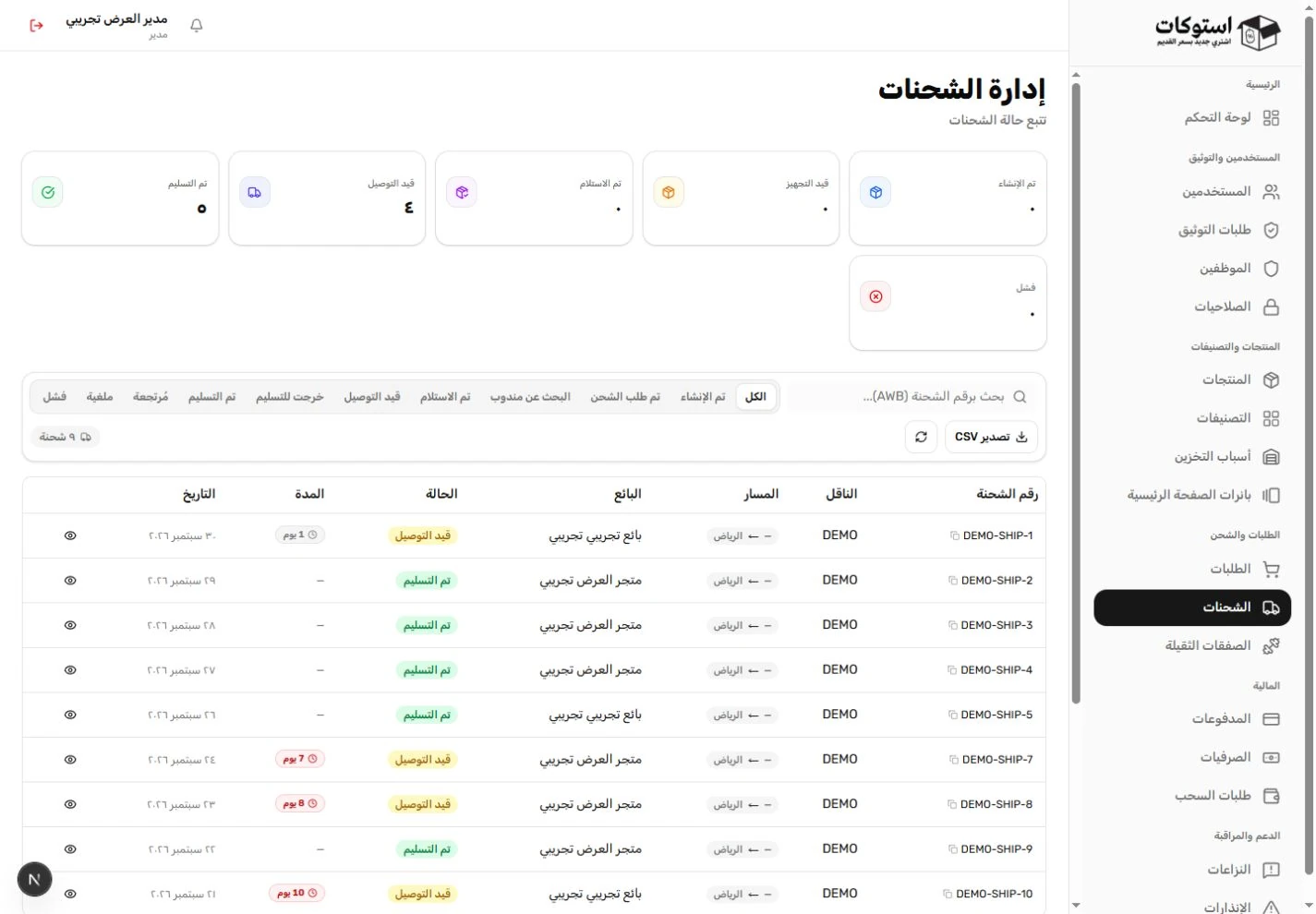
Standard orders follow a defined path: payment authorisation, shipment creation, delivery, the protection period and then eligibility for seller settlement. Buyer and seller both follow the same connected order record, instead of waiting for scattered updates.يمر الطلب العادي بمراحل محددة: تفويض الدفع، فإنشاء الشحنة، فالتسليم، ففترة الحماية، ثم استحقاق التسوية للبائع. ويتابع المشتري والبائع الطلب من سجل واحد مترابط، بدل انتظار تحديثات متفرقة.
See all featuresكل المزايا بالتفصيل
Order tracking for buyersمتابعة الطلبات للمشتري
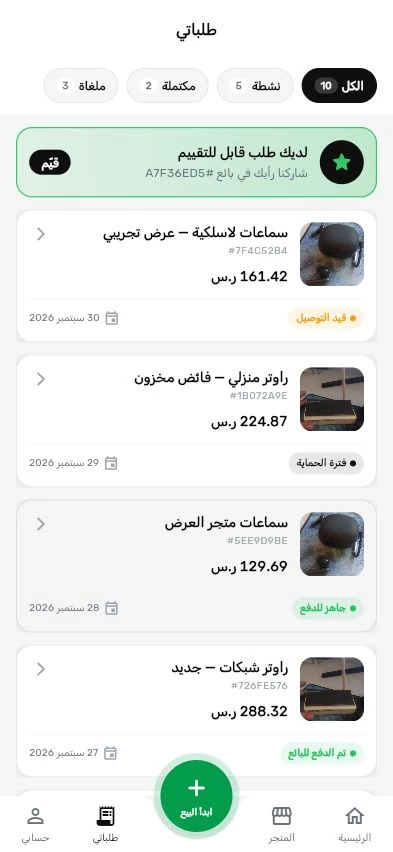
Buyers see their orders grouped by stage and can open each one for a detailed timeline, product details, pickup and delivery addresses and the price breakdown.يرى المشتري طلباته مقسّمة حسب المرحلة، ويفتح أي طلب ليجد مراحله بالتفصيل وبيانات المنتج وعنواني الاستلام والتوصيل وتفاصيل السعر.
Shipping milestonesمراحل الشحن بوضوح
Each order’s shipment view shows its delivery milestones and tracking reference. Your admin team can check shipment status and delivery exceptions.تعرض شاشة الشحنة مراحل التوصيل ورقم التتبع لكل طلب، ويستطيع فريق الإدارة مراجعة حالات الشحن واستثناءات التوصيل.
Order oversight for your teamمتابعة الطلبات من الإدارة
The admin order queue offers search, status filters, order details and export, so your team keeps track of pending and completed orders.توفر قائمة الطلبات في لوحة الإدارة البحث وفلاتر الحالة وتفاصيل الطلب والتصدير، ليتابع فريقك الطلبات المعلقة والمكتملة.
Protection doesn’t end at delivery.الحماية لا تنتهي عند التسليم.
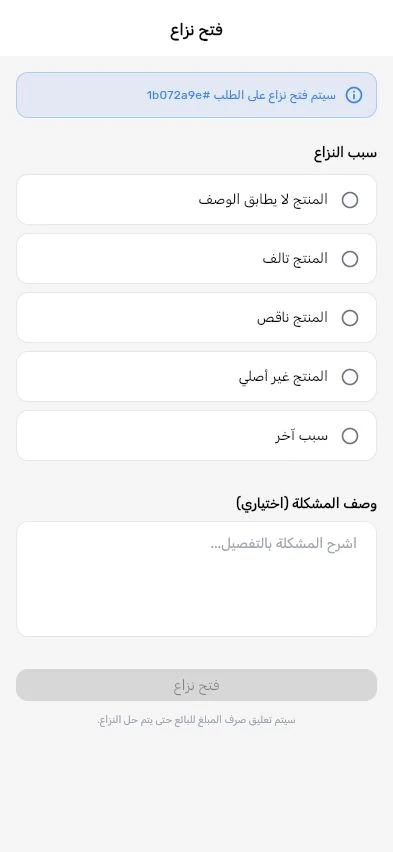
For standard orders, delivery isn’t the last step. A protection window, which you can configure, gives the buyer time to report a problem, and opening a dispute puts the seller’s settlement on hold until it is reviewed.في الطلبات العادية، لا يكون التسليم هو الخطوة الأخيرة. فترة حماية تضبطها من الإعدادات تمنح المشتري وقتًا للإبلاغ عن أي مشكلة، وفتح النزاع يوقف تسوية البائع حتى تتم مراجعته.
See all featuresكل المزايا بالتفصيل
Protection time in viewمدة الحماية أمام المشتري
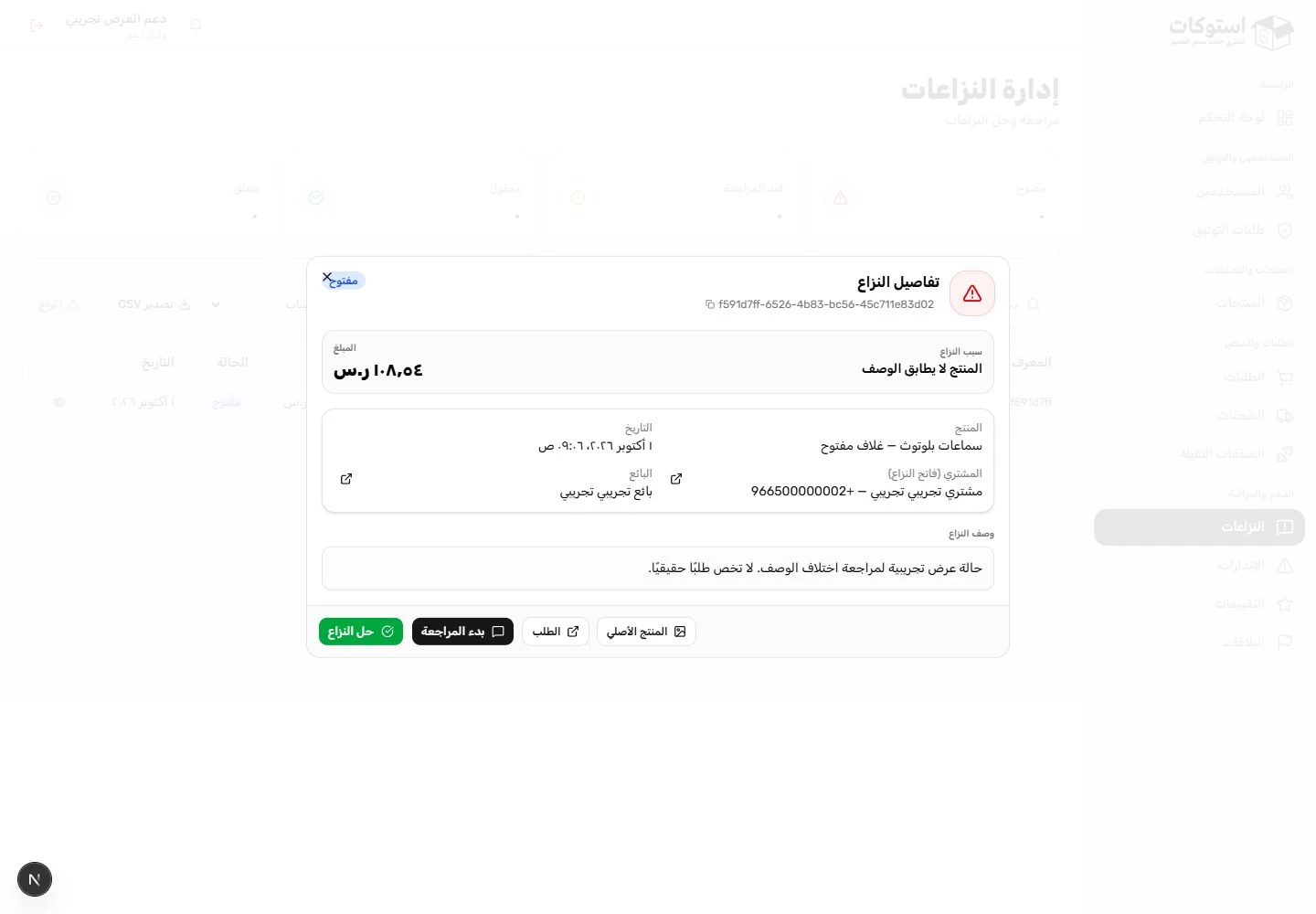
The order shows how much protection time is left and explains how the buyer can open a dispute if the product doesn’t match its description.يعرض الطلب المدة المتبقية من فترة الحماية، ويوضح للمشتري إمكانية فتح نزاع إذا اختلف المنتج عن وصفه.
A clear way to report problemsطريقة واضحة للإبلاغ عن المشكلات
Pick a reason and describe the issue. The screen explains that the seller’s payout is paused until the dispute is resolved.اختر سبب النزاع واكتب وصفًا للمشكلة، وتوضح الشاشة أن صرف المبلغ للبائع متوقف حتى يُحسم النزاع.
Support sees the whole caseفريق الدعم يرى الحالة كاملة
Support can check the dispute, product, buyer, seller, amount and linked order before starting a review or resolving the case.يراجع فريق الدعم النزاع والمنتج والمشتري والبائع والمبلغ والطلب المرتبط قبل بدء المراجعة أو حسم الحالة.
Large items get their own kind of deal.للمنتجات الثقيلة طريقة اتفاق خاصة بها.
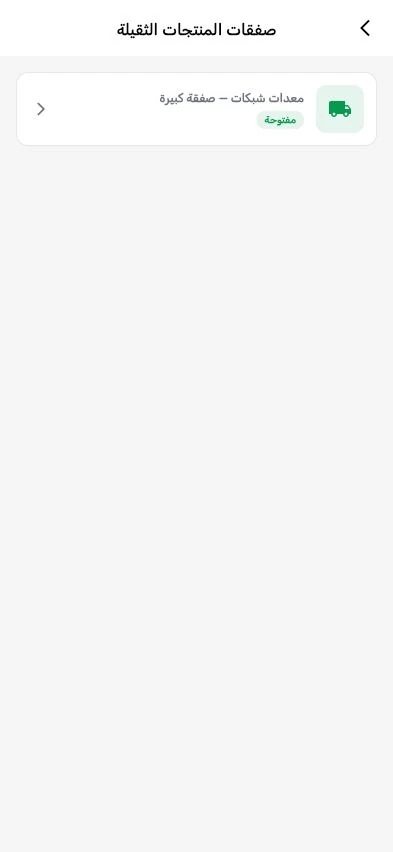
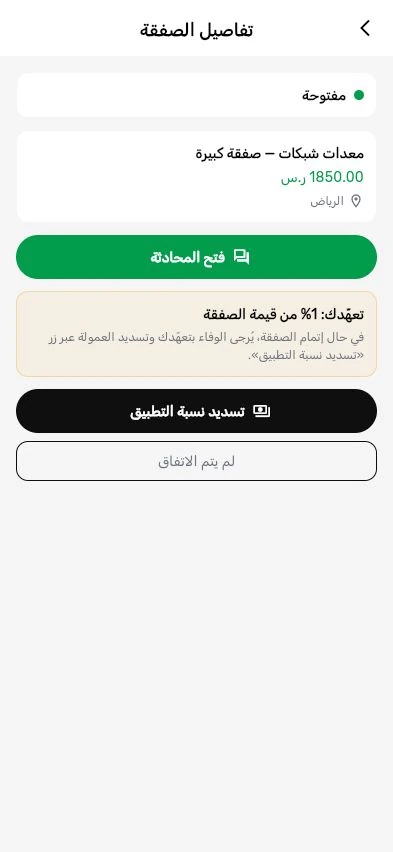
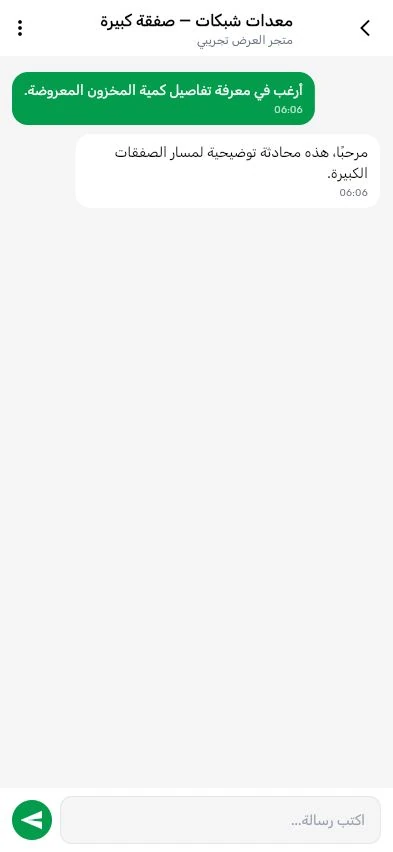
Large items follow a separate route in Stokaat. Buyer and seller chat directly in the app and agree the deal between themselves, with a commission pledge in place of the standard order’s shipping and protection steps.تسلك المنتجات الثقيلة في استوكات مسارًا مستقلًا. يتواصل المشتري والبائع مباشرة داخل التطبيق ويتفقان على الصفقة بينهما، مع تعهد بالعمولة بدلًا من دورة الشحن والحماية الخاصة بالطلب العادي.
See all featuresكل المزايا بالتفصيل
A file for every dealملف مستقل لكل صفقة
Track the product, price, city and agreement status of each large-item deal from the deals screen. Your admin team can oversee these records too.تابِع المنتج والسعر والمدينة وحالة الاتفاق لكل صفقة منتج ثقيل من شاشة الصفقات، ويستطيع فريق الإدارة متابعة هذه السجلات أيضًا.
Direct chat in the appمحادثة مباشرة داخل التطبيق
Each deal opens a conversation linked to the product, so the negotiation stays in one place. Standard orders follow a different communication policy.تفتح كل صفقة محادثة مرتبطة بالمنتج، فتبقى تفاصيل التفاوض في مكان واحد. أما الطلبات العادية فلها سياسة تواصل مختلفة.
Commission by pledgeالعمولة بموجب تعهد
The screen explains the commission pledge, offers a way to pay the platform’s share and records when no agreement is reached. This is a direct-deal path, not the escrow protection used for standard orders.توضح الشاشة تعهد العمولة، وتتيح سداد حصة المنصة، وتسجّل عدم الوصول إلى اتفاق. هذا مسار اتفاق مباشر، ولا يشمل حماية حجز المبلغ المعمول بها في الطلبات العادية.
Seller payouts, checked before they go out.مستحقات البائعين، تُراجَع قبل صرفها.
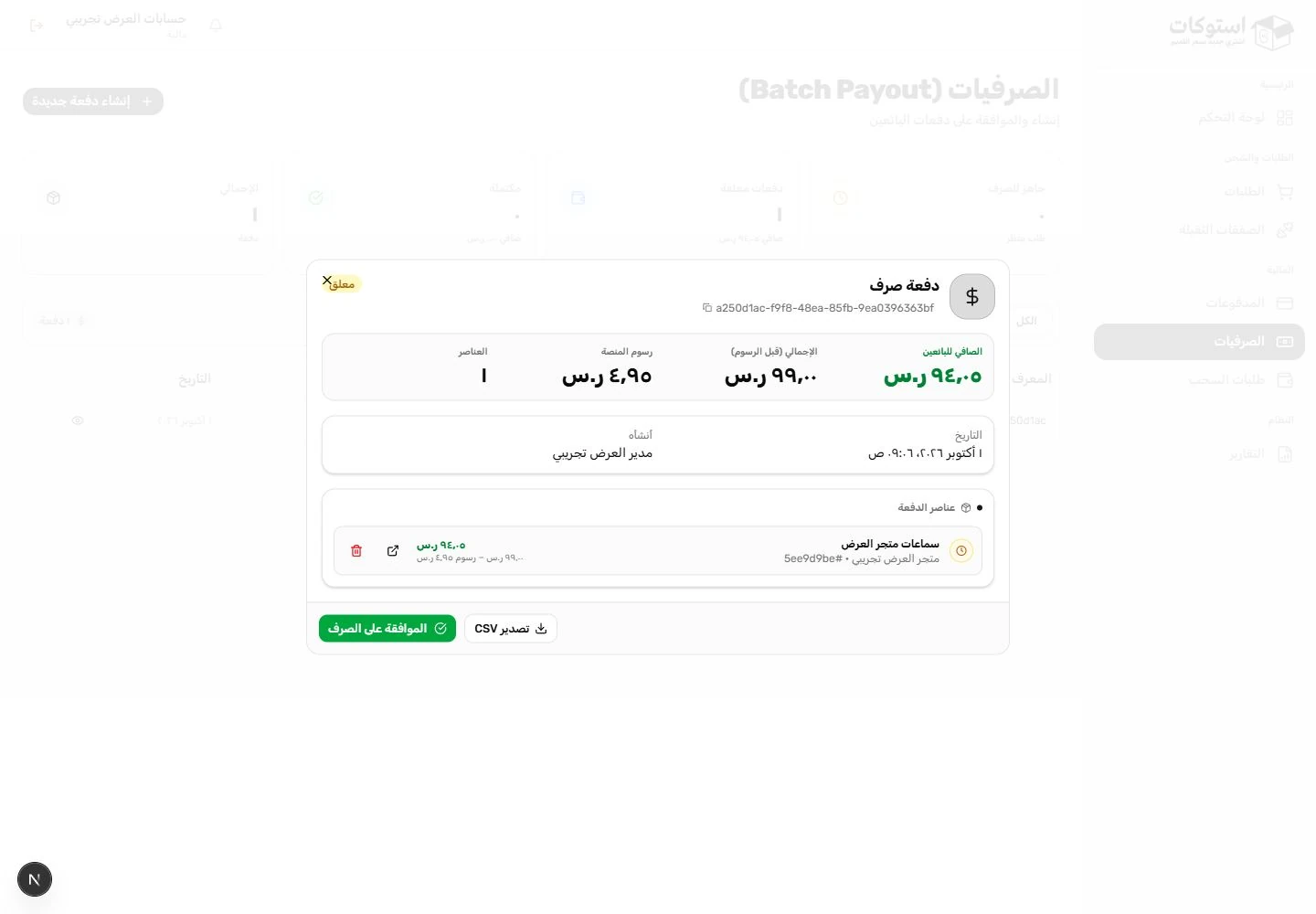
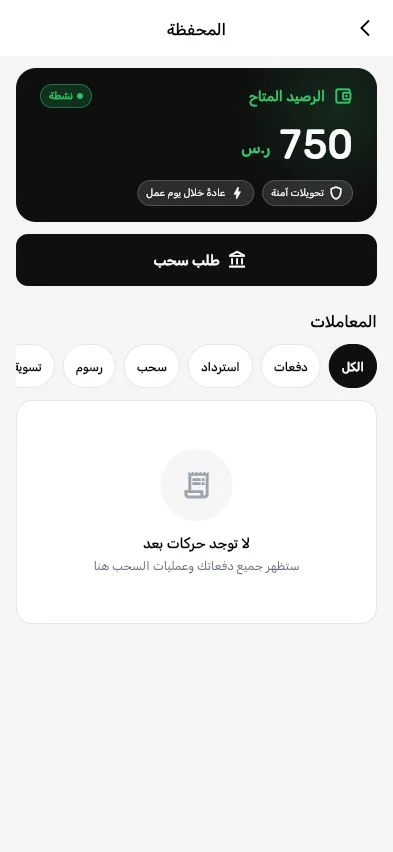
Wallets, payment records and settlement batches make up the finance side. Your team sees the gross product value, platform fees and the seller’s net amount separately before approving a payout batch.تشكّل المحافظ وسجلات المدفوعات ودفعات التسوية الجانب المالي من النظام. ويرى فريقك قيمة المنتج الإجمالية ورسوم المنصة وصافي مستحق البائع كلًّا على حدة قبل اعتماد دفعة الصرف.
See all featuresكل المزايا بالتفصيل
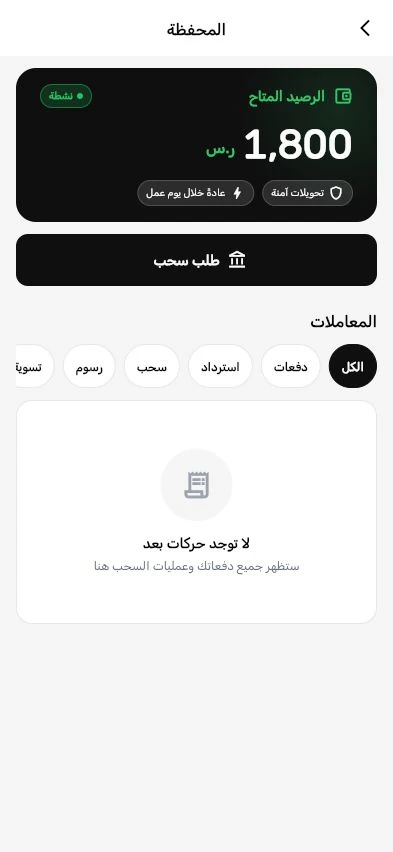
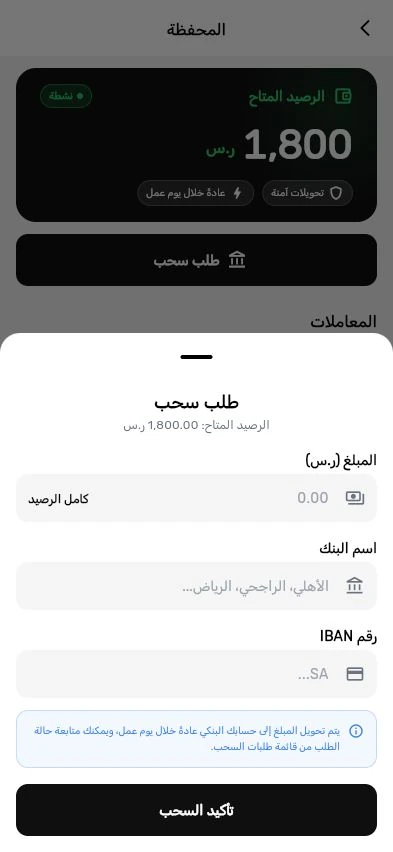
A clear walletمحفظة واضحة
Users see their available balance and filter transactions by category. Eligible sellers request a withdrawal by entering the amount, bank name and IBAN.يرى المستخدم رصيده المتاح ويصفّي المعاملات حسب نوعها، ويطلب البائع المؤهل السحب بإدخال المبلغ واسم البنك ورقم الآيبان.
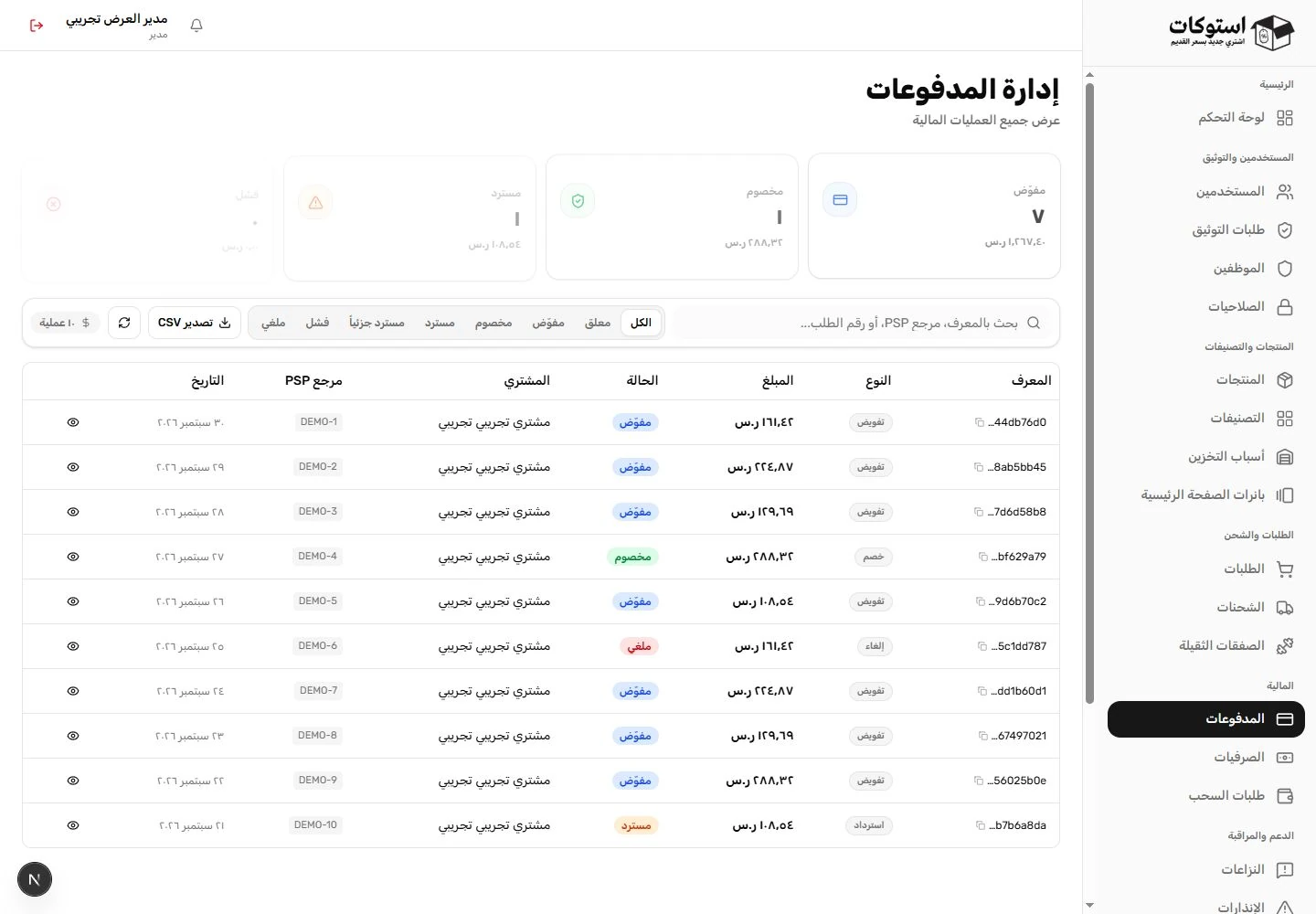
A payment trail for every orderسجل الدفع لكل طلب
Your admin team reviews each payment’s type, status, amount and linked order. Authorisations, payments and refunds all stay on the order’s financial record.يراجع فريق الإدارة نوع كل عملية دفع وحالتها ومبلغها والطلب المرتبط بها، وتبقى سجلات التفويض والدفع والاسترداد جزءًا من السجل المالي للطلب.
Review before settlementمراجعة قبل التسوية
Finance checks each batch item by item: gross amounts, fees and net totals per seller. Batch approval and withdrawal processing each have their own admin controls.يراجع فريق المالية عناصر كل دفعة: المبالغ الإجمالية والرسوم وصافي مستحقات كل بائع. ولاعتماد الدفعات ومعالجة طلبات السحب أدوات إدارية مستقلة.
Run your marketplace by rules your whole team can see.أدِر سوقك بقواعد واضحة أمام فريقك كله.
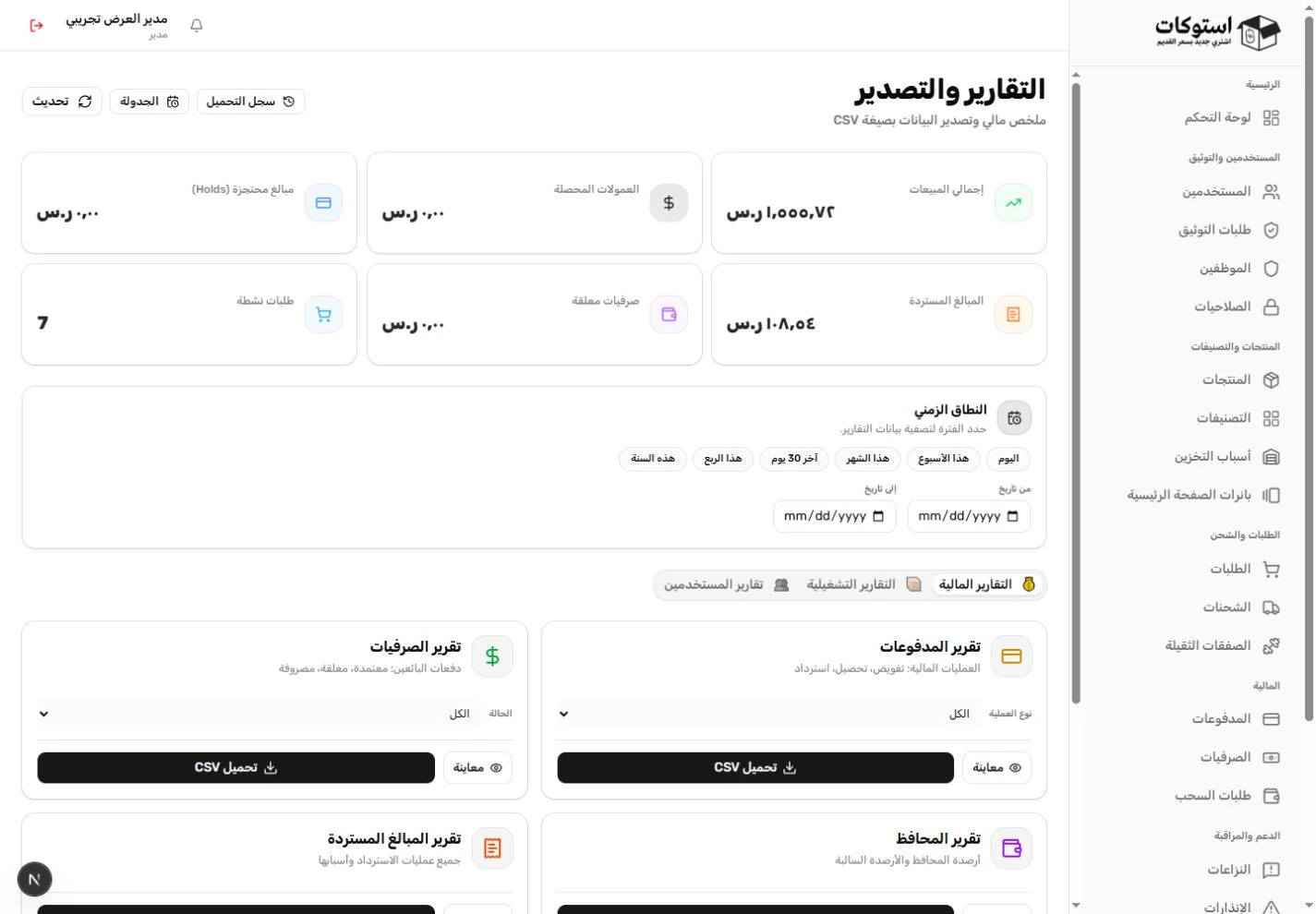
The control panel brings catalogue quality, users, roles and marketplace policies into one place. Administration, support and finance each have their own responsibilities and screens, instead of every employee getting the same tools.تجمع لوحة التحكم جودة الكتالوج والمستخدمين والأدوار وسياسات السوق في مكان واحد. ولكلٍّ من الإدارة والدعم والمالية مسؤولياته وشاشاته، بدل منح كل موظف الأدوات نفسها.
See all featuresكل المزايا بالتفصيل
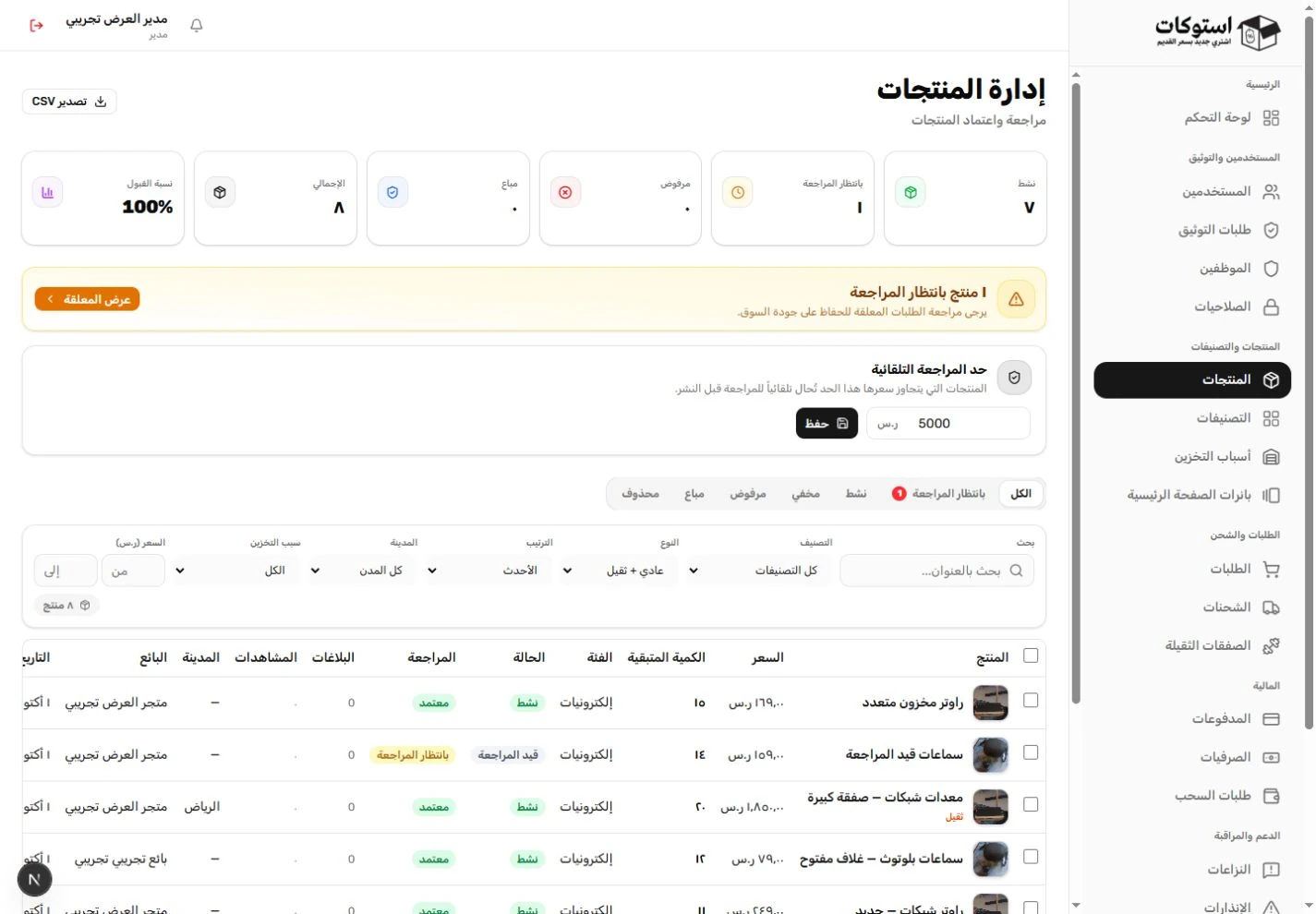
Listing reviewمراجعة الإعلانات قبل النشر
Check each listing before approving or rejecting it, helped by price-based review thresholds, stock reasons, categories and publication status.راجِع كل إعلان قبل اعتماده أو رفضه، مستعينًا بحدود مراجعة مرتبطة بالسعر وأسباب الاستوك والتصنيفات وحالات النشر.
Roles and team accessالأدوار وصلاحيات الفريق
Manage employee roles and permissions. Support and finance accounts each get their own menus and screens, matched to their responsibilities.أدِر أدوار الموظفين وصلاحياتهم، ولحسابات الدعم والمالية قوائم وشاشات مختلفة تناسب مسؤوليات كل منها.
Marketplace policies you controlسياسات السوق تحت إدارتك
Central settings cover fees, tax, buyer protection and other marketplace rules. Report screens give operational and commercial views, with export options.تشمل الإعدادات المركزية الرسوم والضريبة والحماية وباقي قواعد السوق، وتقدم شاشات التقارير رؤية تشغيلية وتجارية مع خيارات للتصدير.
See the marketplace for yourself.شاهد السوق بنفسك.
41 real screenshots. Open any image full screen, zoom in on the details and browse the whole gallery.٤١ لقطة حقيقية من الواجهات. افتح أي صورة بملء الشاشة، وكبِّر التفاصيل، وتنقّل بين صور المشروع كلها.

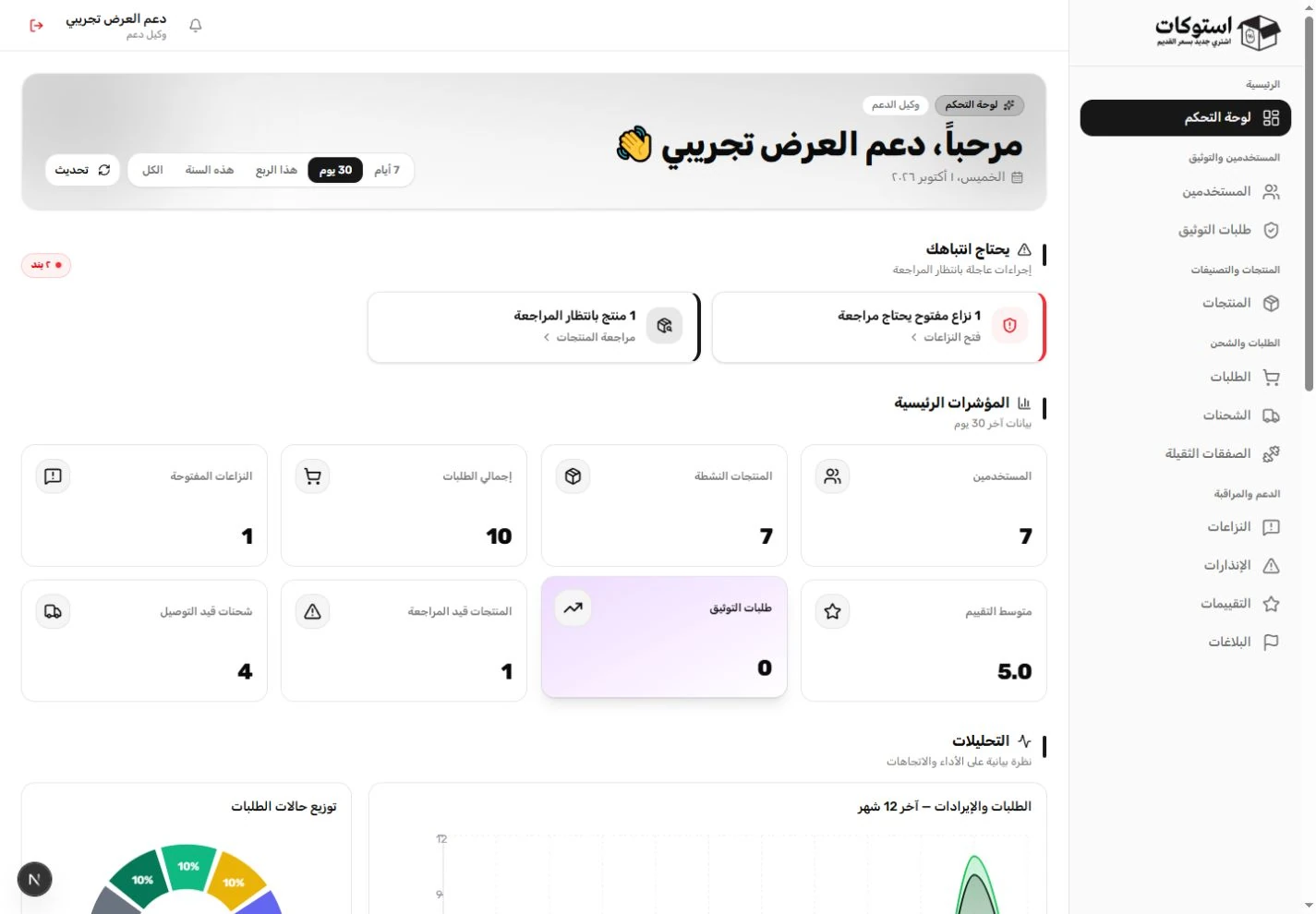
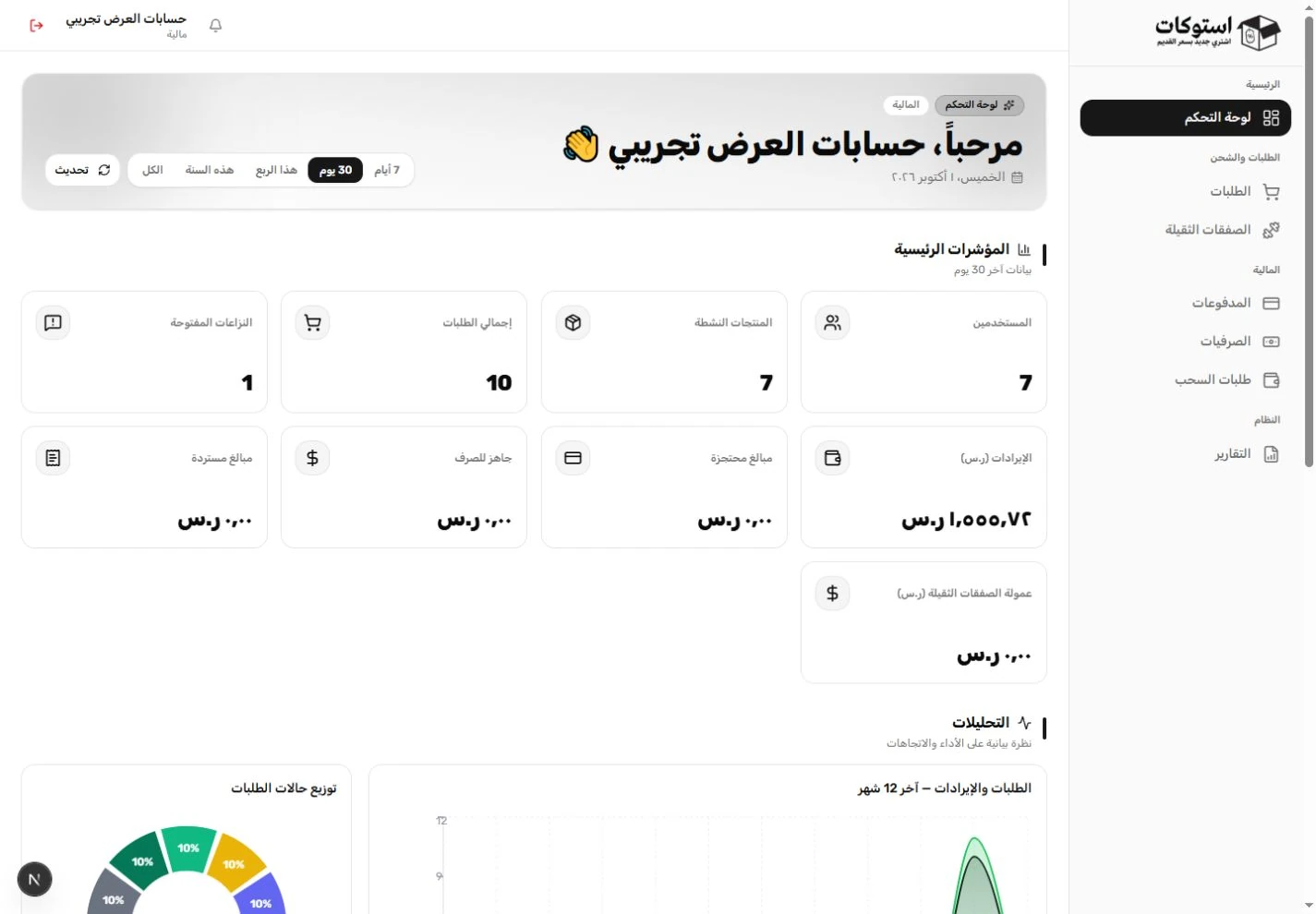
Six roles, each with its own screens.ستة أدوار، ولكلٍّ منها شاشاته.
The demo was opened with buyer, individual seller, verified merchant, administrator, support and finance accounts. Tap a role to see its real screen.فُتحت نسخة العرض بحسابات المشتري والبائع الفرد والتاجر الموثق ومدير النظام والدعم والمالية. اضغط على أي دور لتشاهد شاشته الحقيقية.
One connected platform, set up for its market.منصة واحدة مترابطة، مهيأة لسوقها.
The reviewed code combines a Flutter app, a Next.js admin panel and a NestJS backend running on PostgreSQL and Redis. It also includes integration code for payments, shipping and messaging.يجمع الكود الذي تمت مراجعته بين تطبيق Flutter ولوحة إدارة Next.js وخادم NestJS يعمل مع PostgreSQL وRedis، ويتضمن أيضًا كود تكامل للمدفوعات والشحن والرسائل.
- Paymentsالمدفوعات
- Integration code for Geidea’s hosted payment page, with authorisation, payment and refund paths configured.كود تكامل مع صفحة الدفع المستضافة من Geidea، مع مسارات مهيأة للتفويض والدفع والاسترداد.
- Shippingالشحن
- OTO integration code for shipping standard orders.كود تكامل مع OTO لشحن الطلبات العادية.
- Messagingالرسائل
- Integration code for Taqnyat verification SMS and Firebase notifications.كود تكامل لرسائل التحقق النصية عبر Taqnyat والإشعارات عبر Firebase.
These screenshots come from an isolated local demo. The live payment, shipping and messaging providers were not tested. Before going live, each one needs its provider account, credentials, configuration and end-to-end validation.هذه اللقطات من نسخة عرض محلية معزولة، ولم تُختبر خدمات الدفع والشحن والرسائل الحقيقية. وقبل التشغيل الفعلي يحتاج كل منها إلى حساب لدى مزود الخدمة، وبيانات ربط، وتهيئة، وتحقق كامل من الدورة من البداية إلى النهاية.
All names, orders, amounts and dashboard figures are synthetic demo data. They show how the interface works, not real usage or business results. The proposed expansion into wholesale lots is not part of what is shown here.كل الأسماء والطلبات والمبالغ وأرقام اللوحات بيانات تجريبية لأغراض العرض. هدفها توضيح الواجهة، وليست أرقام استخدام فعلية أو نتائج تجارية. أما التوسع المقترح لبيع لوطات الجملة فهو خارج نطاق ما يُعرض هنا.